How to customize BrowseSupportFragment to show text and image preview above Row list
Nobody has claimed this yet.
Assessment
- Difficulty
- 5/5
- Estimated time
- Over a week
- Newbie friendliness
- 25/100
- Issue type
- Feature
- Clarity
- Needs clarification
- Activity status
- Stale
- Domain
- mobile-dev
Research direction
Start by reading the BrowseSupportFragment entry point and the available Leanback Fragment, Class, and Activity APIs mentioned in the issue. Determine whether they support the requested text-and-poster preview above the Rows, and identify the relevant tv-samples example if one exists. Done means the customization approach is established and demonstrated or documented.
Written by the indexing model from the issue text.
Description
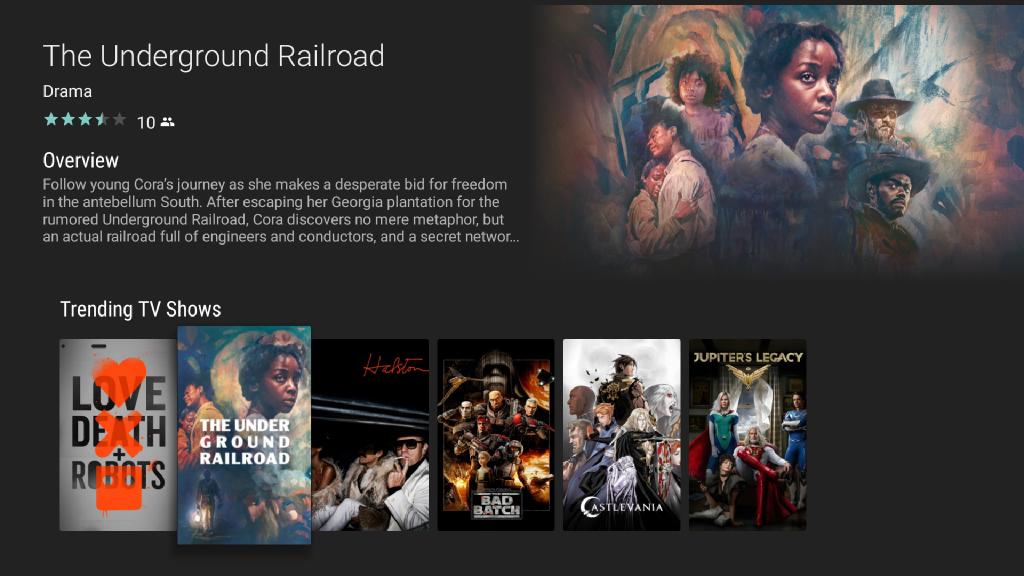
Now the problem is how to design the preview section in the top with a combination of Text and the Program poster as the BrowseFragment shows the Rows from the top left corner of the screen.
Do we need to use our customization or we can just use any of the Leanback library Fragment/Class/Activity?
- Dominant language
- Kotlin
- Stars
- 1.3k
- Forks
- 400
- Avg merge
- 9d 10h
- Merged PRs (30d)
- 2
Getting set up
- No Dockerfile or Docker Compose file
- No pull request template
- Read the contributing guide
First steps
- Read the whole issue, then the project's contributing guide.
- Comment on the issue to say you are picking it up — it saves two people doing the same work.
- Fork the repository and make your change on a branch.
- Open a pull request that references the issue number.
More from android/tv-samples
-
Difficulty 4/5 3-5 days Newbie friendliness 42/100
android/tv-samples#227 ·
-
Difficulty 4/5 3-5 days Newbie friendliness 30/100
android/tv-samples#220 ·
-
Difficulty 3/5 1-2 days Newbie friendliness 32/100
android/tv-samples#218 ·
-
Difficulty 5/5 Over a week Newbie friendliness 10/100
android/tv-samples#216 ·
-
Difficulty 3/5 1-2 days Newbie friendliness 35/100
android/tv-samples#215 ·
All issues in android/tv-samples
Similar issues
-
enhancement
Difficulty 2/5 1-3 hours Newbie friendliness 62/100
MetrolistGroup/Metrolist#5426 · 1 comment · 1 reaction ·
Maintainers usually reply within 1 day
-
🐛 Type:Bug 📥 State:Awaiting Assignment 🚨 Priority: P0 - Critical
Difficulty 2/5 1-3 hours Newbie friendliness 78/100
-
good first issue help wanted
Difficulty 2/5 1-3 hours Newbie friendliness 76/100
micronizationlab/glafira-ai-hub#785 ·
Maintainers usually reply within 1 day
-
Difficulty 2/5 1-3 hours Newbie friendliness 78/100
sorsama/deepseek-harness-mobile#154 ·
Maintainers usually reply within 1 day
-
0. Needs triage enhancement
Difficulty 2/5 1-3 hours Newbie friendliness 82/100
Maintainers usually reply within 1 day