Bug Report: Docs tables scroll horizontally and squeeze columns
Maintainers usually reply within 1 day
Nobody has claimed this yet.
Assessment
- Difficulty
- 2/5
- Estimated time
- 1-3 hours
- Newbie friendliness
- 76/100
- Issue type
- Bug
- Clarity
- Clearly specified
- Activity status
- Active
- Tech stack
- react, tailwindcss, typescript
- Domain
- documentation, frontend
Research direction
Start in src/templates/Handbook.tsx, where the table shortcode uses OverflowXSection, and inspect how it sets table width and horizontal overflow. Reproduce the reported wrapping on the Workload identity for GitHub Actions page, then check other docs or handbook tables for the same behavior. Done when tables fill the content column with readable columns and scroll horizontally only when wider than the window.
Written by the indexing model from the issue text.
Description
Report
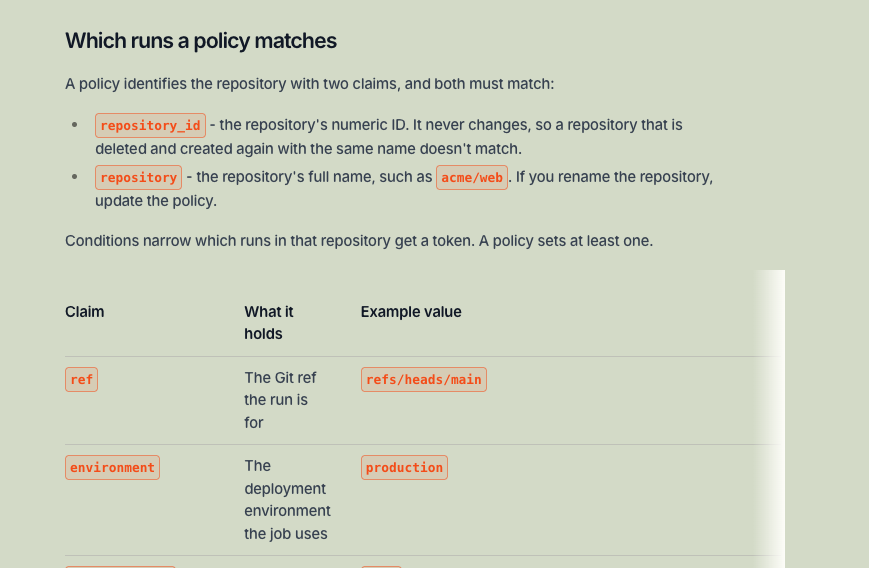
Markdown tables in docs scroll horizontally, also when the content area has sufficient space. The columns become narrow and the text wraps on almost every word. A right-edge fade shows, so the table looks cut off.
Example: the "Which runs a policy matches" table on Workload identity for GitHub Actions (preview build).
Technical info
- Markdown tables in docs and handbook pages go through
OverflowXSectioninsrc/templates/Handbook.tsx(thetableshortcode). - The issue is possibly not specific to this page. Other docs pages with tables can have the same problem.
- Browser and device: not known (reported from a screenshot).
Expected outcome, or solution
Tables use the full width of the content column, and the columns have a readable width. Horizontal scroll occurs only when the table is wider than the window.
Created with PostHog from a Slack thread
- Dominant language
- TypeScript
- Stars
- 1.2k
- Forks
- 952
- Avg merge
- 1d 17h
- Merged PRs (30d)
- 747
Getting set up
Starts the project's dev container in your browser, under your own GitHub account.
- No Dockerfile or Docker Compose file
- Has a pull request template
- No contributing guide
First steps
- Read the whole issue, then the project's contributing guide.
- Comment on the issue to say you are picking it up — it saves two people doing the same work.
- Fork the repository and make your change on a branch.
- Open a pull request that references the issue number.
More from PostHog/posthog.com
-
Difficulty 2/5 1-3 hours Newbie friendliness 84/100
PostHog/posthog.com#22222 · 1 comment ·
Maintainers usually reply within 1 day
-
Difficulty 2/5 1-3 hours Newbie friendliness 83/100
PostHog/posthog.com#22167 · 1 comment ·
Maintainers usually reply within 1 day
-
Difficulty 2/5 1-3 hours Newbie friendliness 85/100
PostHog/posthog.com#22000 · 1 comment ·
Maintainers usually reply within 1 day
-
Website request - Let forum moderators merge duplicate postsPossibly taken @smallbrownbike claimed this 2 days ago. Openwebsite
PostHog/posthog.com#22347 · 5 comments · 1 assignee ·
Maintainers usually reply within 1 day
-
Website request - Sources marketing pagesPossibly taken @smallbrownbike claimed this 2 days ago. Openwebsite
PostHog/posthog.com#22336 · 1 comment · 3 assignees ·
Maintainers usually reply within 1 day
All issues in PostHog/posthog.com
Similar issues
-
enhancement needs peer review
Difficulty 2/5 1-3 hours Newbie friendliness 72/100
pnp/cli-microsoft365#7696 ·
Maintainers usually reply within 3 days
-
Add: AutomotoOpencheck:passed streams:add
Difficulty 2/5 1-3 hours Newbie friendliness 75/100
Maintainers usually reply within 1 day
-
documentation
Difficulty 2/5 1-3 hours Newbie friendliness 85/100
Maintainers usually reply within 1 day
-
bug
Difficulty 2/5 1-3 hours Newbie friendliness 80/100
inmanta/web-console#7899 ·
Maintainers usually reply within 1 day