Feature: Decay adjustments
Maintainers usually reply within 1 day
Nobody has claimed this yet.
Assessment
- Difficulty
- 5/5
- Estimated time
- Over a week
- Newbie friendliness
- 25/100
Research direction
Start by locating ElasticPress's existing decay-function implementation and comparing its configuration with Elasticsearch's function-score decay documentation. Then scope the required settings, visualization, and usage profiles; done means the supported variables, defaults, interface, and resulting query behavior are specified.
Written by the indexing model from the issue text.
Description
In various use cases the age of a post can be a relevant factor for its importance. Ie. for a news site more recent content is more relevant while for a shop the age of a product might not be relevant. For a site dealing with scientific data more recent might still be relevant but the metrics to consider still differ a lot from a news site.
Luckily Elasticsearch offer a decay function that can be used and is already implemented to some degree into ElasticPress, however it would be great to make this configuration more intuitive and more refined.
Ideally there should be an interface that allows adjustment of all the variables of the decay function outlined at https://www.elastic.co/guide/en/elasticsearch/reference/current/query-dsl-function-score-query.html#function-decay and build the resulting search query accordingly.
A nice interface that allows for dynamic visualization of the selected values similar to
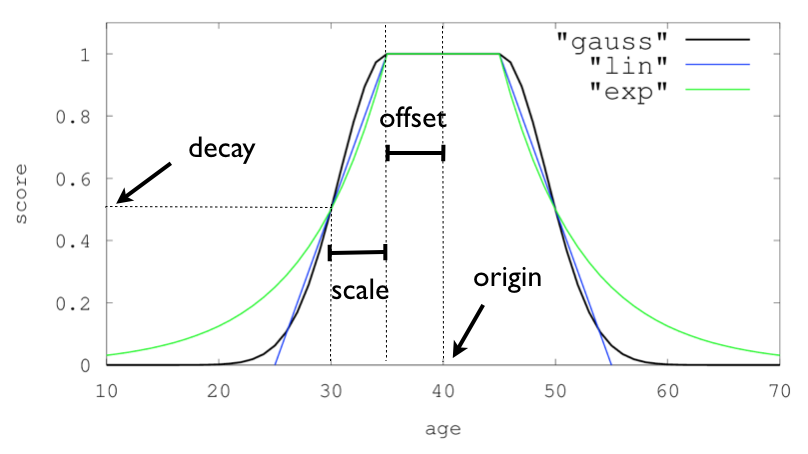
and intelligently adjusting the scale to the available content would be ideal.
Additionally usage profiles for common use cases could be implemented to set reasonable default settings.
- Dominant language
- PHP
- Stars
- 1.3k
- Forks
- 325
- Avg merge
- 2d 11h
- Merged PRs (30d)
- 24
Getting set up
- No Dockerfile or Docker Compose file
- No pull request template
- Read the contributing guide
First steps
- Read the whole issue, then the project's contributing guide.
- Comment on the issue to say you are picking it up — it saves two people doing the same work.
- Fork the repository and make your change on a branch.
- Open a pull request that references the issue number.
More from 10up/ElasticPress
-
bug
Difficulty 2/5 1-3 hours Newbie friendliness 76/100
10up/ElasticPress#4402 · 1 comment ·
Maintainers usually reply within 1 day
-
enhancement
Difficulty 4/5 3-5 days Newbie friendliness 45/100
10up/ElasticPress#4390 ·
Maintainers usually reply within 1 day
-
[Release] 5.3.6Open
Difficulty 4/5 3-5 days Newbie friendliness 15/100
10up/ElasticPress#4388 ·
Maintainers usually reply within 1 day
-
Move AI Features from ElasticPress Labs to the ElasticPress PluginPossibly taken @ZacharyRener claimed this 124 days ago. Openenhancement
10up/ElasticPress#4316 · 2 comments · 1 assignee ·
Maintainers usually reply within 1 day
-
Convert Pointers class to functional componentPossibly taken @ZacharyRener claimed this 288 days ago. Openenhancement
10up/ElasticPress#4261 · 1 assignee ·
Maintainers usually reply within 1 day
All issues in 10up/ElasticPress
Similar issues
-
bug command:plugin-update scope:documentation
Difficulty 1/5 Under an hour Newbie friendliness 83/100
wp-cli/extension-command#572 ·
-
Difficulty 2/5 1-3 hours Newbie friendliness 67/100
-
Difficulty 2/5 1-3 hours Newbie friendliness 78/100
Maintainers usually reply within 1 day
-
Difficulty 2/5 1-3 hours Newbie friendliness 75/100
Freegle/Iznik#2023 · 1 comment ·
Maintainers usually reply within 1 day
-
Difficulty 2/5 1-3 hours Newbie friendliness 78/100
Maintainers usually reply within 1 day