
xamarin/Xamarin.Forms
[Bug] iOS - ContentLayout ignored if text changed from empty string to text after button rendered
开放
#8,646 创建于 2019年11月25日
e/3 :clock3:help wantedp/iOS 🍎t/bug :bug:up-for-grabs
仓库指标
- 星标
- (5,644 个星标)
- PR 合并指标
- (30 天内没有已合并 PR)
描述
Description
The ContentLayout of a button is ignored on iOS if the text of the button is changed after the button is initially rendered.
If the button is defined like this in the XAML:
And then the text is changed like this:
Then the button looks like this on iOS:
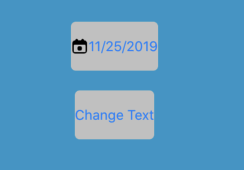
But it works correctly on Android:
Steps to Reproduce
- Start the app on an iOS simulator
- Tap the "Change Text" button
Expected Behavior
For both platforms, image should be shown on the right
Actual Behavior
On iOS, the image is shown on the left On Android, the image is shown on the right
Basic Information
- Version with issue:
- Last known good version:
- IDE: Visual Studio for Mac
- Platform Target Frameworks:
- iOS: 13.4.0.2
- Nuget Packages: Xamarin Forms 4.3.991211
- Affected Devices: iOS devices
Screenshots
(see description)