xamarin/Xamarin.Forms
[iOS, Android] Unintended space underneath nested GridLayout in ListView with grouping
开放
#5,440 创建于 2019年3月4日
a/layouta/listviewe/6 :clock6:help wantedinactivep/Androidp/iOS 🍎t/bug :bug:up-for-grabs
仓库指标
- 星标
- (5,644 个星标)
- PR 合并指标
- (30 天内没有已合并 PR)
描述
Description
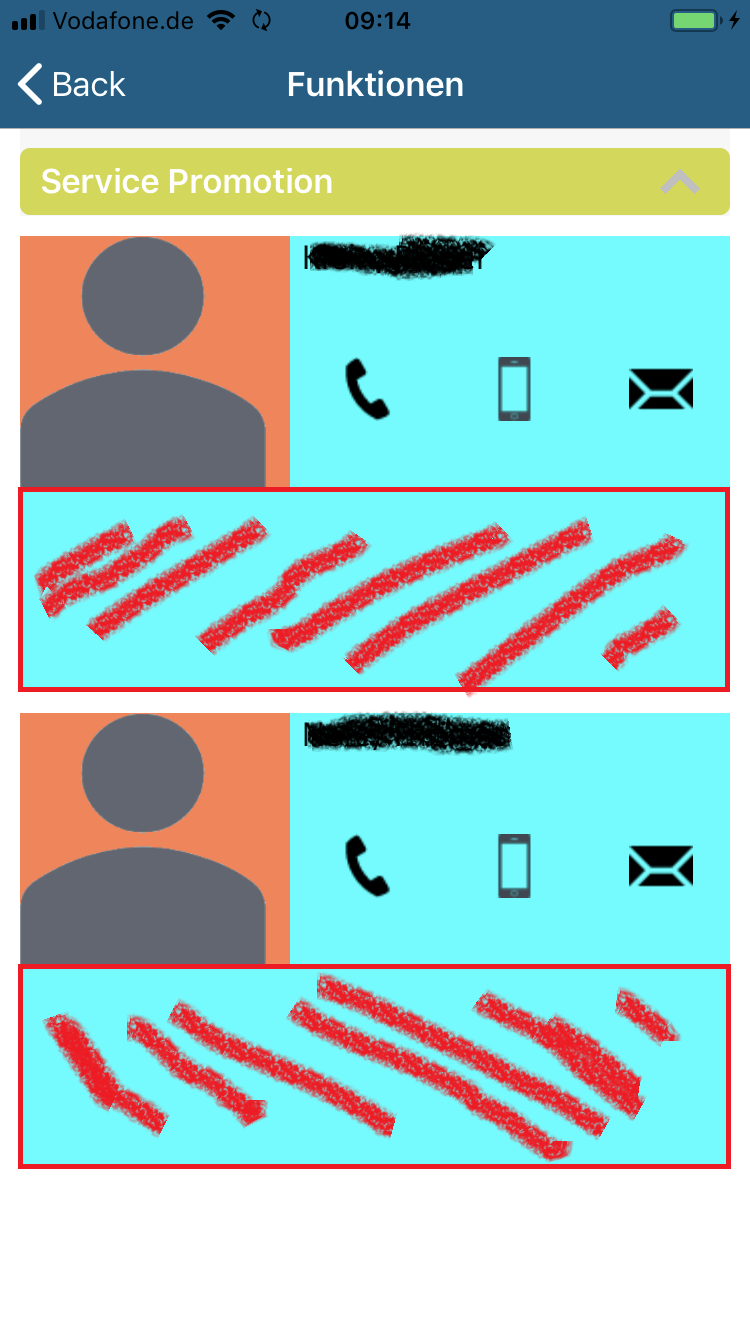
I got some unexpected behavior with a GridLayout nested in a ListView with grouping enabled. In the first screenshot you see some unintended space marked red. I colored some elements to make the layout more visible. I didn't define that space in the xaml file! In the second screenshot you see the rows and colums I defined in xaml which meet exactly my expactations. The problem only occurs in portrait device orientation.
It seems for me that the ListView maybe want to fill out the whole page vertically.
See the repo below with a sample project.
Expected Behavior
Only margin of 10 after the GridLayout.
Actual Behavior
Undefined space after each GridLayout (see first screenshot) which is not part of the rows and columns.
Basic Information
- Visual Studio 2017 Version 15.9.7
- Platforms:
- iOS Simulator with iOS 12.1 (iPhone SE & iPhone 8)
- real iPhone 7 with iOS 12.1.4
- Android 8.1 Emulator
- Xamarin.Forms 3.6.0.220655
Screenshots