
[MultistepDialog] Right panel does not vertically fill the dialog
#4,870 创建于 2021年8月20日
仓库指标
- 星标
- (20,263 个星标)
- PR 合并指标
- (PR 指标待抓取)
描述
Environment
- Package version(s):
@blueprintjs/core 3.48.0@blueprintjs/core 4.3.0
Code Sandbox
https://codesandbox.io/s/blueprint-sandbox-multistepdialog-0q5cju
Steps to reproduce
- Create a
<MultistepDialog> - Add multiple very short steps
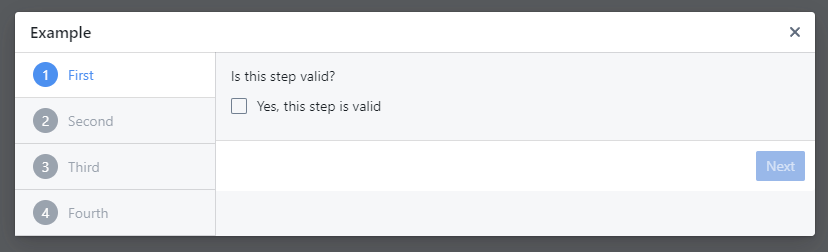
- ❌ See that the footer row of buttons does not align with the bottom of the dialog
Actual behavior
The right-hand panel of the dialog does not extend to the bottom of the dialog if the height of the step navigation is larger than the height of the step content.
This is more obvious in the dark theme than the light theme, depending on your monitor's color reproduction.
Light
Dark

Expected behavior
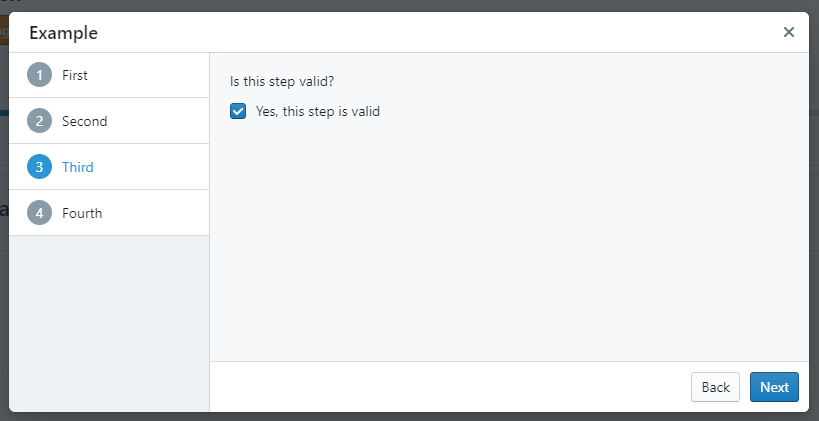
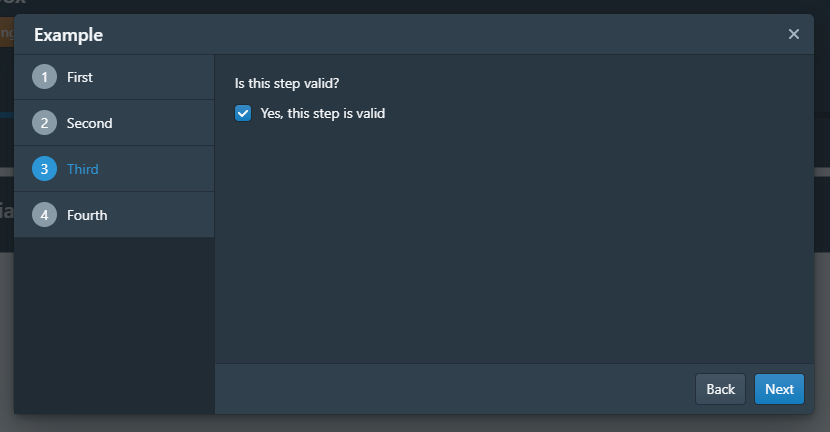
Both panels of the dialog extend to the bottom of the dialog.
Light (and min-height for the example)
Dark (and min-height for the example)
Possible solution
I was able to fix this for my own project by rendering <div className={Classes.DIALOG_BODY}> as the first child of the <DialogStep>'s panel prop, and adding the following additional SCSS:
.bp3-multistep-dialog-panels {
  flex: 0 1;

  .bp3-multistep-dialog-right-panel {
    display: flex;
    flex-direction: column;
  }
}
I see that a <div className={Classes.DIALOG_BODY}> is also used in the docs example, is there any reason why this must be added manually and isn't rendered by the <MultistepDialog> or <DialogStep>?