
microsoft/Terminal
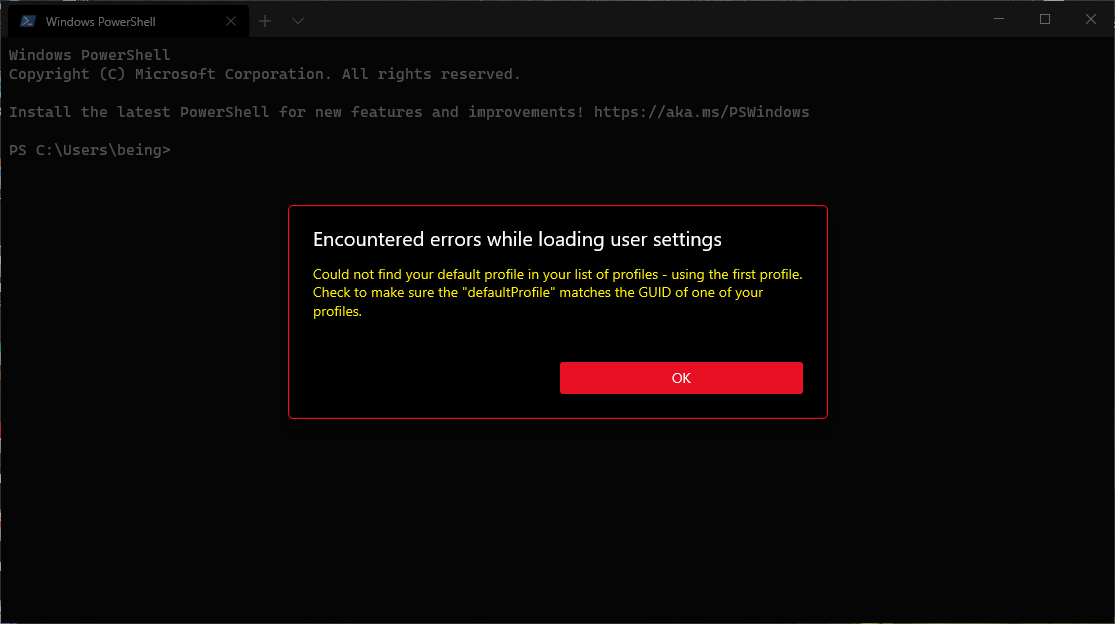
When WSL is slow to respond, and a WSL profile is default, we throw a weird error message
已关闭
#6,160 创建于 2020年5月23日
Area-SettingsHelp WantedIssue-BugProduct-Terminal
仓库指标
- 星标
- (103,173 个星标)
- PR 合并指标
- (平均合并 27天 19小时) (30 天内合并 24 个 PR)
描述
Environment
Windows build number: Microsoft Windows [Version 10.0.19628.1]

Windows Terminal version (if applicable): Windows Terminal Version: 1.0.1401.0

Any other software?
Steps to reproduce
After booting completes. Open terminal. And error pops up. Close the terminal and reopen, then the terminal open the shell in /mnt/c/Users/being$ directory.
After again closing the terminal and reopen it starts working normally.
Expected behavior
Load all the settings listed in C:\Users\being\AppData\Local\Packages\Microsoft.WindowsTerminal_8wekyb3d8bbwe\LocalState\settings.json file correctly
And open in just 1 time.
Actual behavior
- After first opening the terminal this error pops up.
Encountered errors while loading user settings
-
After second opening the terminal. It starts in
/mnt/c/Users/being$irrespective of starting directory mentioned in the setting.json -
After 3 time opening the terminal it works correctly.
-
Actual json file.
 // This file was initially generated by Windows Terminal 0.11.1333.0
 // It should still be usable in newer versions, but newer versions might have additional
 // settings, help text, or changes that you will not see unless you clear this file
 // and let us generate a new one for you.

 // To view the default settings, hold "alt" while clicking on the "Settings" button.
 // For documentation on these settings, see: https://aka.ms/terminal-documentation
 {
    "$schema": "https://aka.ms/terminal-profiles-schema",

    "defaultProfile": "{2c4de342-38b7-51cf-b940-2309a097f518}",

    // You can add more global application settings here.
    // To learn more about global settings, visit https://aka.ms/terminal-global-settings

    // If enabled, selections are automatically copied to your clipboard.
    "copyOnSelect": false,

    // If enabled, formatted data is also copied to your clipboard
    "copyFormatting": false,

    // A profile specifies a command to execute paired with information about how it should look and feel.
    // Each one of them will appear in the 'New Tab' dropdown,
    //   and can be invoked from the commandline with `wt.exe -p xxx`
    // To learn more about profiles, visit https://aka.ms/terminal-profile-settings
    "profiles":
    {
        "defaults":
        {
            // Put settings here that you want to apply to all profiles.
        },
        "list":
        [
            {
                "guid": "{2c4de342-38b7-51cf-b940-2309a097f518}",
                "hidden": false,
                "name": "Ubuntu",
                "source": "Windows.Terminal.Wsl",
                "startingDirectory": "\\\\wsl$\\Ubuntu\\home\\dark",
                "icon" : "C:\\Users\\being\\ubuntu.png"
            },
            {
                // Make changes here to the powershell.exe profile.
                "guid": "{61c54bbd-c2c6-5271-96e7-009a87ff44bf}",
                "name": "Windows PowerShell",
                "commandline": "powershell.exe",
                "hidden": false
            },
            {
                // Make changes here to the cmd.exe profile.
                "guid": "{0caa0dad-35be-5f56-a8ff-afceeeaa6101}",
                "name": "Command Prompt",
                "commandline": "cmd.exe",
                "hidden": false
            },
            {
                "guid": "{b453ae62-4e3d-5e58-b989-0a998ec441b8}",
                "hidden": false,
                "name": "Azure Cloud Shell",
                "source": "Windows.Terminal.Azure"
            }
        ]
    },

    // Add custom color schemes to this array.
    // To learn more about color schemes, visit https://aka.ms/terminal-color-schemes
    "schemes": [],

    // Add custom keybindings to this array.
    // To unbind a key combination from your defaults.json, set the command to "unbound".
    // To learn more about keybindings, visit https://aka.ms/terminal-keybindings
    "keybindings":
    [
        // Copy and paste are bound to Ctrl+Shift+C and Ctrl+Shift+V in your defaults.json.
        // These two lines additionally bind them to Ctrl+C and Ctrl+V.
        // To learn more about selection, visit https://aka.ms/terminal-selection
        { "command": {"action": "copy", "singleLine": false }, "keys": "ctrl+c" },
        { "command": "paste", "keys": "ctrl+v" },

        // Press Ctrl+Shift+F to open the search box
        { "command": "find", "keys": "ctrl+shift+f" },

        // Press Alt+Shift+D to open a new pane.
        // - "split": "auto" makes this pane open in the direction that provides the most surface area.
        // - "splitMode": "duplicate" makes the new pane use the focused pane's profile.
        // To learn more about panes, visit https://aka.ms/terminal-panes
        { "command": { "action": "splitPane", "split": "auto", "splitMode": "duplicate" }, "keys": "alt+shift+d" }
    ] }