
featuregood first issuewidget
仓库指标
- 星标
- (30,491 个星标)
- PR 合并指标
- (平均合并 24天 11小时) (30 天内合并 11 个 PR)
描述
As this image shows, I would like to adjust the pick_list item border to patch that of the dropdown menu itself:
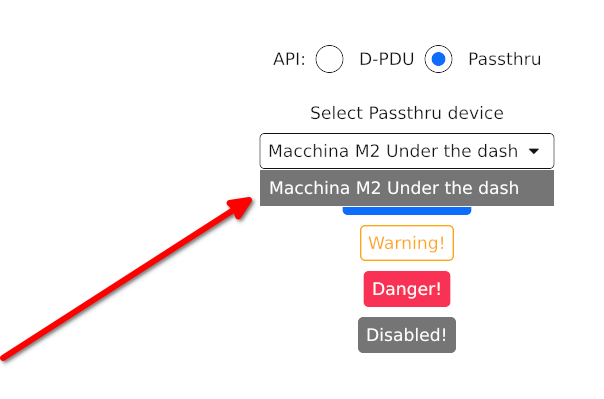
Currently, I have the following code to implement picklist::StyleSheet
impl pick_list::StyleSheet for DropDown {
    fn menu(&self) -> Menu {
        Menu {
            text_color: WHITE.into(),
            background: DARK_BG.into(),
            border_width: BUTTON_RADIUS,
            border_color: WHITE.into(),
            selected_text_color: WHITE.into(),
            selected_background: GREY.into()
        }
    }

    fn active(&self) -> pick_list::Style {
        match super::get_theme() {
            super::Style::Light => pick_list::Style {
                text_color: DARK_BG.into(),
                background: WHITE.into(),
                border_radius: BUTTON_RADIUS,
                border_width: 1.0,
                border_color: DARK_BG.into(),
                icon_size: 0.5
            },
            super::Style::Dark => pick_list::Style {
                text_color: WHITE.into(),
                background: DARK_BG.into(),
                border_radius: BUTTON_RADIUS,
                border_width: 1.0,
                border_color: WHITE.into(),
                icon_size: 0.5
            }
        }
    }

    fn hovered(&self) -> pick_list::Style {
        pick_list::Style {
            text_color: WHITE.into(),
            background: GREY.into(),
            border_radius: BUTTON_RADIUS,
            border_width: 1.0,
            border_color: WHITE.into(),
            icon_size: 0.5
        }
    }
}
There does not seem to be an adjustment option for the pick_lists item view border radius