描述
Description
Closing the guided conflicts modal reveals that additional merges (or even the same merge again) can be attempted, but results in GIT errors. I suspect that undo or revert could be bad ideas at this time too. Error messages are given (hinting conflicts need resolved first), and nothing bad seems to happen.
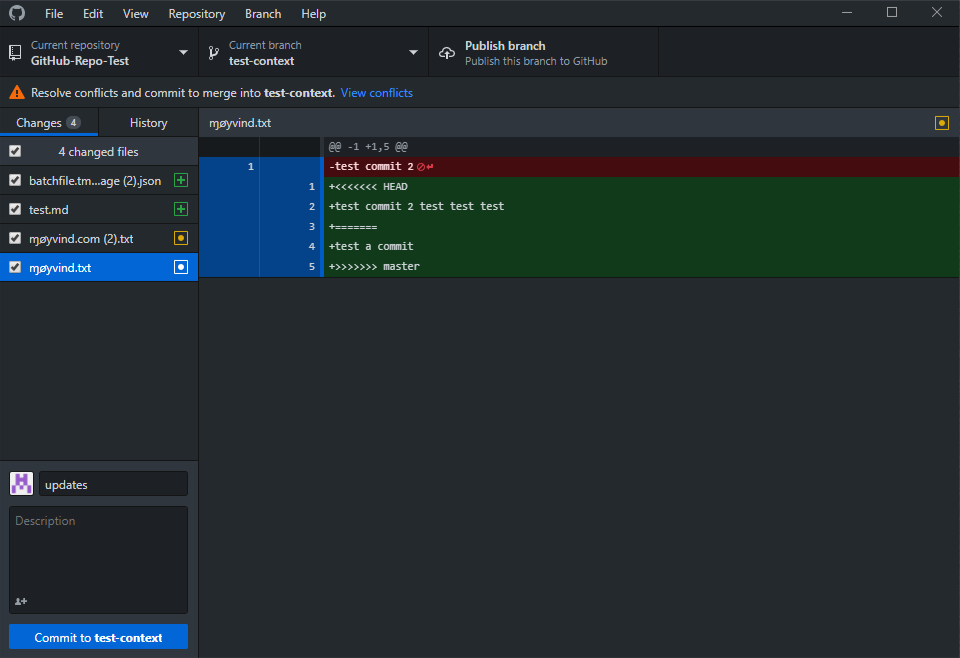
UNDO could be worse, as it just automatically merges the undo in to your working tree, with the conflict banner remaining on screen, but no conflicts present (via icons) though the original conflicted file remains as if it were conflicted. (see below)
Version
- GitHub Desktop: 1.5.1-beta5 (but self-built using Node 10)
- Operating system: Win 10 18298 preview
Steps to Reproduce
- close the merge conflict modal
- attempt another merge because all the merge buttons are still enabled.
Expected Behavior
I might expect only finishing or aborting the current merge would be possible, or that doing some things should bring up the 'abort conflicted merge' flow (confirmation that is really want you want to do, then unwind the conflicted merge) before continuing.
Actual Behavior
The merge buttons attempt to merge more changes, or even the same changes again, but results in GIT errors.
Additional Information
Keep in mind that my understanding of conflict resolution is limited as I have not dealt a lot with it. I was testing the latest beta since it added the 'close guided conflict modal' feature.
merge button enabled for the exact same merge I just attempted that I am still in conflict resolution for.

Merge conflict markers not treated special, is it not supposed to be?

After pressing 'undo'... yikes, how am I going to fix this? (good its just a sandbox!)
The conflict banner went away when I closed Desktop and reopened it, and the guided conflict modal did not reopen either.