
[Bug] TitleView behavior inconsistent between Android and iOS
#6,522 建立於 2019年6月13日
倉庫指標
- 星標
- (5,644 顆星)
- PR 合併指標
- (PR 指標待抓取)
描述
Description
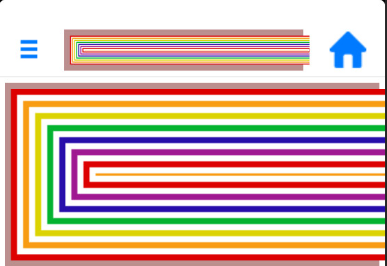
Created a TitleView that contains an image set to Aspect.Fit. The image is resized in Android, but not in iOS. In iOS the image is cut off.
Added padding and margin on the TitleView. Android didn't change, Added a ToolbarItem. The TitleView on Android resized so the full image displayed in the reduced space. On iOS the image is not resized, it is cut off.
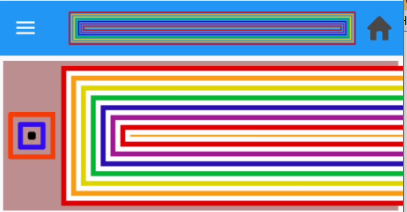
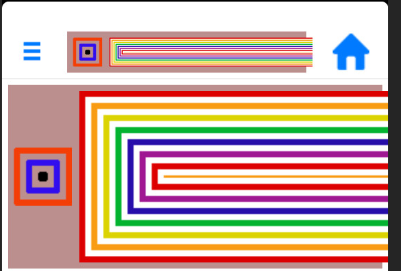
Changed the TitleView to add a second image, a label, and a background color. Android did not change at all. iOS did display the changes, at least as many would fit on the screen, as the image was still cut off.
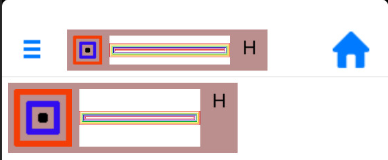
Changed the initial image to add a width request. iOS displayed the image in a smaller size, Android did not
Steps to Reproduce
- Run the attached test app on Android and iOS.
Android:

iOS:
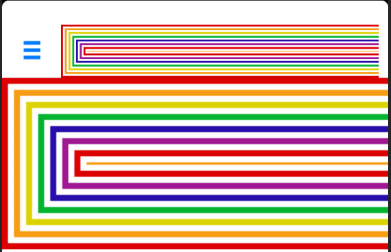
-
in TitleView.cs, uncomment the Margin and Padding lines (32 & 33) Android:
 iOS:
iOS:
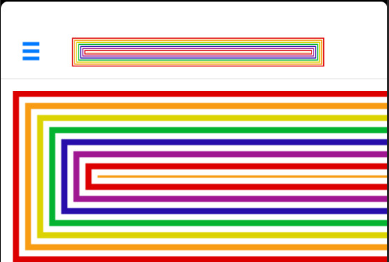
-
In the same file, uncomment the two Background Color lines (14 & 34) Android:
 iOS:
iOS:
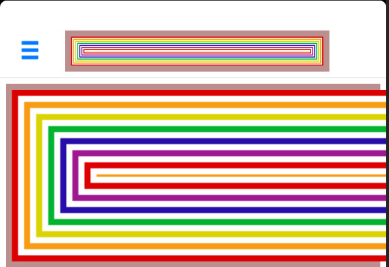
-
In TargetedMessagePage.xaml.cs, uncomment the ToolbarItems line (23) Android:
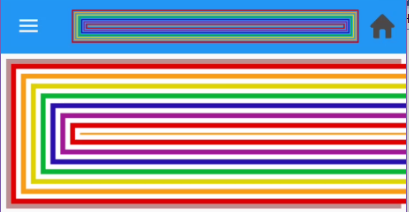 iOS:
iOS:
-
In TitleView.CS, comment out the Children declaration with one item (28) and uncomment the one with three (29) Android:
 iOS:
iOS:
6: In TItleView.cs, uncomment the WidthRequest line (15)
Android:
 iOS:
iOS:
Expected Behavior
The TitleView should properly reflect the changes in both environments.
Actual Behavior
See above
Basic Information
- Version with issue: 4.1.0 pre2
- Last known good version:
- IDE:
- Platform Target Frameworks:
- iOS:
- Android:
- UWP:
- Android Support Library Version:
- Nuget Packages:
- Affected Devices:
Screenshots
see above