
palantir/blueprint
在 GitHub 查看DateRangeInput shows wrong time in input field on mouseover
Open
#4,239 建立於 2020年7月23日
P2Package: datetimeType: bughelp wanted
描述
Environment
- Package version(s): 3.18.4
- Operating System: macOS 10.15
- Browser name and version: Chrome 84
Code Sandbox
This is reproducible in the official documentation for the component.
Steps to reproduce
- Enable the time picker on a DateRangeInput (in the docs, toggle "Enable time picker")
- Change the date format to anything that shows the time (in the docs, select "YYYY-MM-DD HH:mm:ss (moment)")
- Focus one of the input fields
- Hover over any date
Actual behavior
Regardless of what is entered in the time picker, the input field shows 12:00 PM on hover. After you click, the entered time is applied to the input field, as expected.
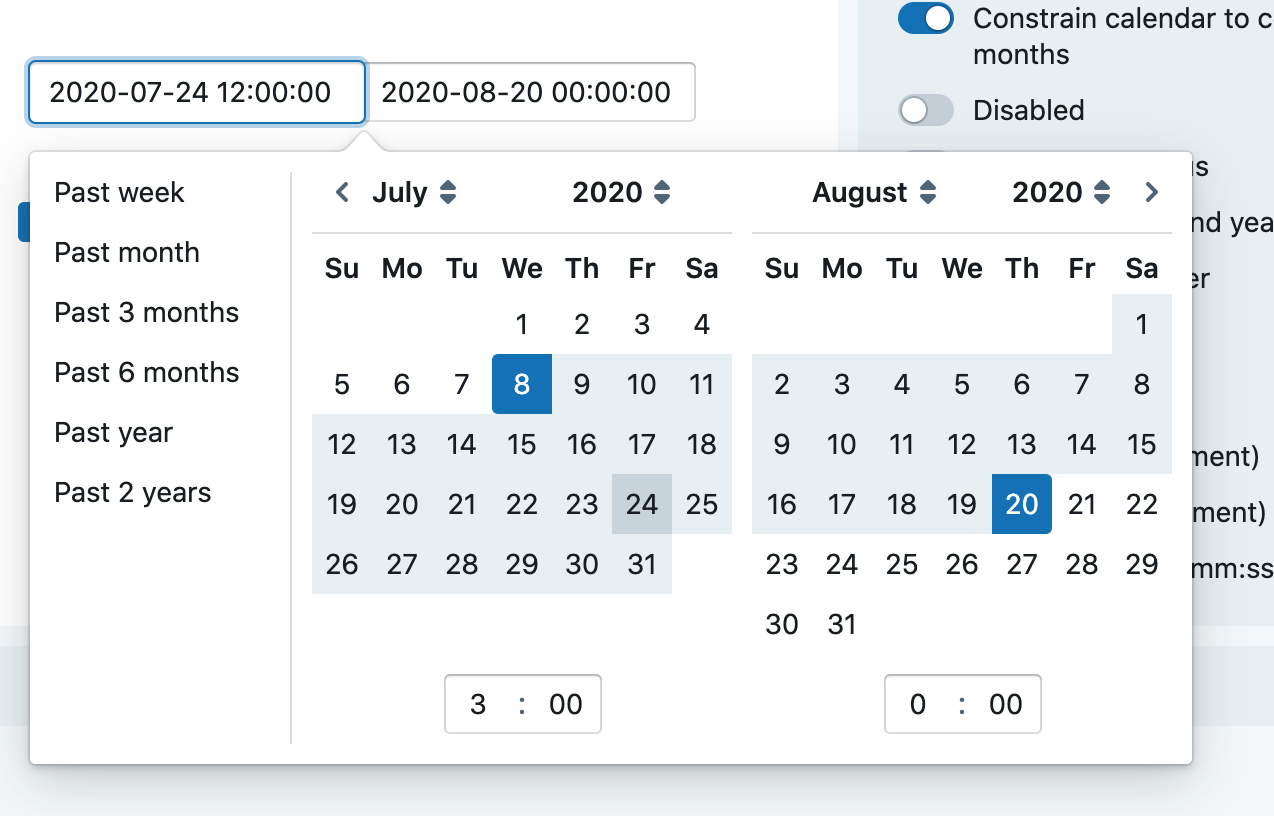
Expected behavior
I would expect what is shown on hover to match what will be applied when you click. Specifically, I would expect the selected time to be respected.