
area-Commandingarea-Flyoutsbughelp wantedteam-Controls
倉庫指標
- Star
- (5,815 star)
- PR 合併指標
- (平均合併 5天 15小時) (30 天內合併 9 個 PR)
描述
Describe the bug
If a CommandBar AppBarButton opens a flyout and the button is currently on the overflow of the CommandBar, when the flyout is opened it appears behind the overflow menu and there is no way to view the flyout contents.
Steps to reproduce the bug
- Create a
CommandBarand add a button to the secondary commands - Add a Flyout to this button
- Launch the app and activate the button
- Notice the flyout appears behind the overflow button
See This repo for an example project.
Expected behavior Flyout should appear above the button.
Screenshots
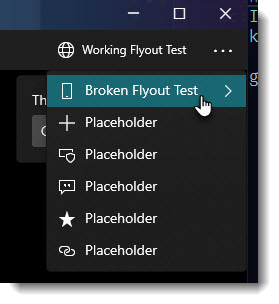
Version Info
NuGet package version: Microsoft.UI.Xaml 2.5.0
| Windows 10 version | Saw the problem? |
|---|---|
| Insider Build (xxxxx) | |
| October 2020 Update (19042) | Yes |
| May 2020 Update (19041) | Yes |
| November 2019 Update (18363) | Yes |
| May 2019 Update (18362) | Yes |
| October 2018 Update (17763) | No |
| April 2018 Update (17134) | |
| Fall Creators Update (16299) | |
| Creators Update (15063) |
| Device form factor | Saw the problem? |
|---|---|
| Desktop | Yes |
| Xbox | |
| Surface Hub | |
| IoT |