
Visual Studio only formats if/while(...) when contents of (...) requires formatting
#21,138 建立於 2017年7月26日
倉庫指標
- 星標
- (20,414 顆星)
- PR 合併指標
- (PR 指標待抓取)
描述
Version Used:
Visual Studio 2015 - 2017 (15.2)
Steps to Reproduce:
- Enter
if(true == false){orwhile(true == false){in the Visual Studio editor.
Expected Behavior:
I'd expect this to be formatted to while (true == false) { }.
Actual Behavior:
It is actually formatted to while(true == false) { }.
(note the missing after the while(.
If you enter while(true==false){, it gets formatted to while (true == false) { as I'd expect. if(true){ also becomes if (true) {.
It's actually different with for(var x=0;x<10;x++){, which becomes for(var x = 0; x < 10; x++) { }. In this case no is inserted in the for( despite the contents of (...) being formatted.
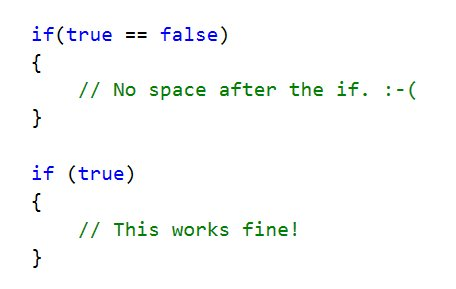
Because this behavior is inconsistent between (true) and (true == false), I'm constantly getting tripped up by it. 😭
See Twitter thread here: https://twitter.com/jcansdale/status/890186489912545282