
倉庫指標
- 星標
- (75,475 顆星)
- PR 合併指標
- (平均合併 1小時 18分鐘) (30 天內合併 1 個 PR)
描述
Bug Description
There's a number of people who use optimized keyboard layouts, such as Dvorak or Colemak.
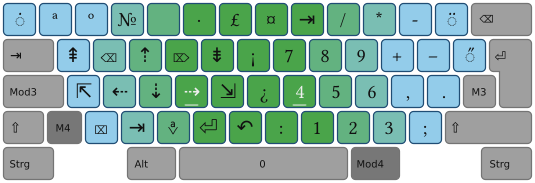
It's common for these layouts to incorporate additional layers, letting users type special symbols or access navigation more easily. For example, layouts of the NEO-family (warning: German website) let you easily access navigation functionality without moving your hands to the edges of your keyboard.
The issue is that AppFlowy doesn't seem to recognize that layer. It just ignores anything typed using it. For example, if I try to move around in this text I'm composing by using the arrow keys provided by my keyboard, it works on GitHub. In AppFlowy, nothing happens.
This is a big issue because it prevents any user of this kind of optimized keyboard layout from using AppFlowy, as it disabled all their navigation. Which is unfortunate, because I (and others) would love to use this app.
How to Reproduce
I can only give instructions for Linux:
- Go to your keyboard-settings
- Select a layout such as Neo 2, Bone, or KOY (and make it your main layout, just to be sure)
- Go to Appflowy and place your cursor somewhere inside a text
- Try moving your cursor left and right by holding down a
M4orMod4(as can be seen here) and pressingsorfon your physical keyboard. - See bug: Nothing happens, whereas every other app with a text input would let you move the cursor
Expected Behavior
Users of optimized keyboard layouts should be able to input characters and use their keyboard's functionality as they should be able to do in any other app.
Operating System
Linux Mint 21.3 Cinnamon
AppFlowy Version(s)
0.5.1, Installed via Flatpak, but also happens on the Snap version
Screenshots
No response
Additional Context
My hunch is that AppFlowy captures inputs that use M4 or Mod4 (as can be seen here) and selectively ignores some/most of them, as it might expect some kind of shortcut.