
xamarin/Xamarin.Forms
ImageCell line Separator not Rendering properly on iOS ListView
Open
#4,711 opened on Dec 12, 2018
a/listviewe/2 :clock2:good first issuehelp wantedinactivep/iOS 🍎t/bug :bug:up-for-grabs
Repository metrics
- Stars
- (5,644 stars)
- PR merge metrics
- (No merged PRs in 30d)
Description
Description
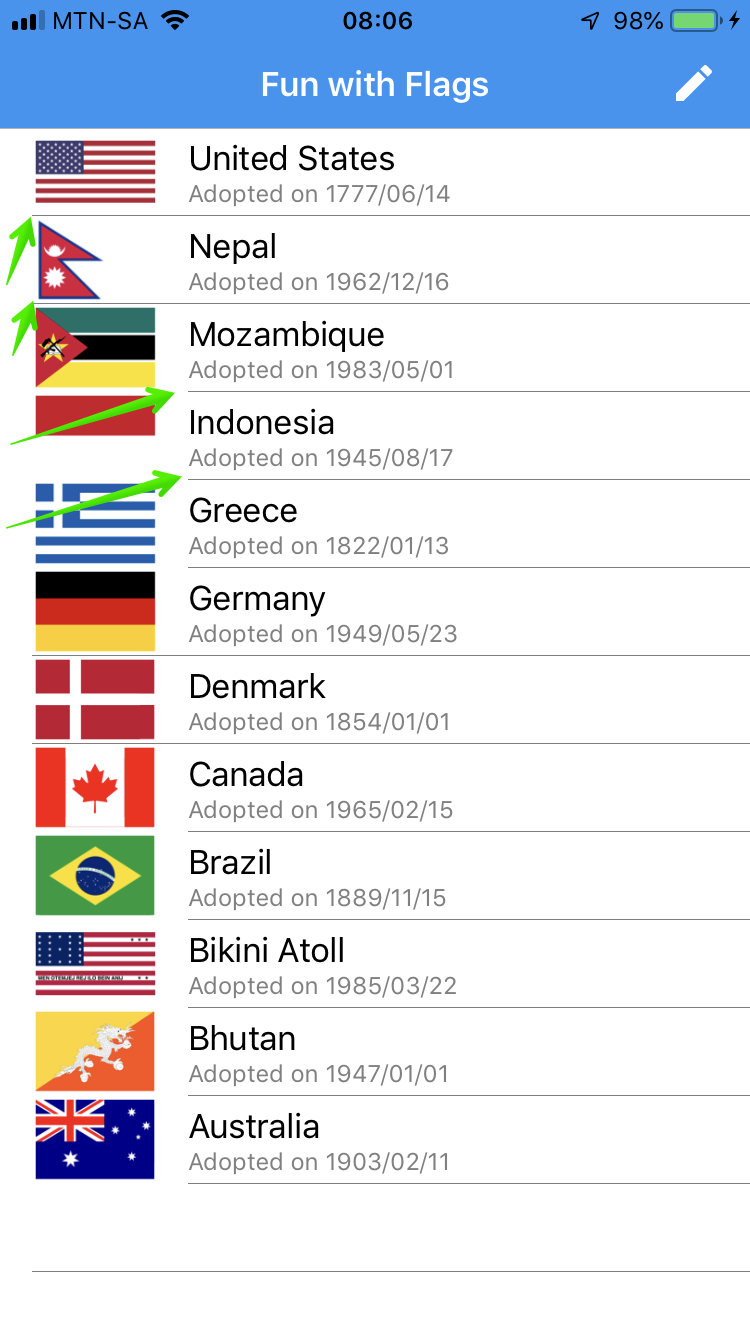
When using an ImageCell in a ListView, and all the properties of the ImageCell are set, specifically the ImageSource, the list item separator is not shown.
Creating a custom ViewCell with a a grid and an Image to emulate a similar layout doesn't have the same issue. The list item separator is rendered fine.
Steps to Reproduce
- Create ListViewXAML or Code)
- Create an ImageCell
- Set the Text, Detail and Image Source
Expected Behavior
All list items should be separated by a grey line separator
Actual Behavior
No list items are separated by a grey line separator. When pulling the listview down to force a repaint of the top list items, the line is drawn only for the first 2 items.
Basic Information
- Version with issue: 3.4.0.1008975
- Last known good version: /
- IDE: Visual Studo for Mac
- Platform Target Frameworks:
- iOS:
- Nuget Packages: Xamarin.Forms
- Affected Devices:
Screenshots

Reproduction Link
This can be reproduced using the Xamarin University Example XAM280 (Exercise 5 complete) Or download my source code on github: https://github.com/rogerwcpt/xamarin-forms-list-app