
e/4 :clock4:help wantedp/UWPt/bug :bug:up-for-grabs
Repository metrics
- Stars
- (5,644 stars)
- PR merge metrics
- (No merged PRs in 30d)
Description
Description
Originally reported in bugzilla https://bugzilla.xamarin.com/show_bug.cgi?id=60369.
Steps to Reproduce
- Start the attached project.
- If the app starts on a 100% scaled monitor it's all well. You can move the app to a 200% monitor and it scales up well again.
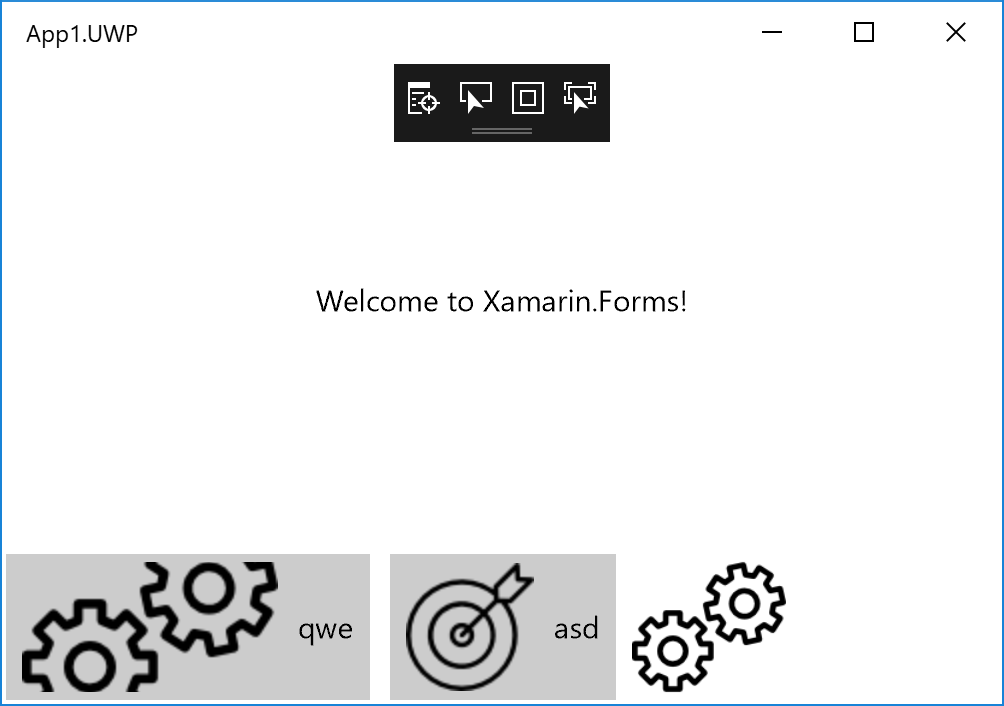
- If the app starts on a 200% monitor, the button image is over-scaled.
Expected Behavior
Button image should show "as usual".
Actual Behavior
Button image is over-scaled.
Basic Information
- Version with issue: 3.0
- Last known good version: N/A
- IDE: VS2017
- Platform Target Frameworks:
- UWP: 16299
Screenshots
100% monitor
 200% monitor
 Android device
