〖工具推荐〗一个把飞书文档一键发布到微信公众号草稿箱的 CLI
Nobody has claimed this yet.
Assessment
- Difficulty
- 1/5
- Estimated time
- Under an hour
- Newbie friendliness
- 68/100
- Issue type
- Documentation
- Clarity
- Mostly clear
- Activity status
- Quiet
- Tech stack
- markdown
- Domain
- content
Research direction
Review the linked feishu-wechat-cli repository and the documented publish examples first. Confirm the described Feishu-to-WeChat draft workflow and decide whether this recommendation fits the weekly's content; done when the submission is accepted or declined.
Written by the indexing model from the issue text.
Description
1. 自我介绍
大家好,我最近开源了一个小工具 feishu-wechat-cli。
它做的事情很简单:把飞书文档一键发布到微信公众号草稿箱。
如果你平时是在飞书里写文章,定稿后还要手工导出、处理图片、再进公众号后台发文,这个工具就是为这条链路准备的。
仓库地址:
https://github.com/shing19/feishu-wechat-cli
2. 开发背景
我做它的原因很直接:现在很多内容都是在飞书里写和协作的,但真正发到公众号时,中间还是有不少重复劳动。
通常要经历这几步:
- 从飞书把内容导出来
- 重新处理正文图片
- 在公众号后台重新上传素材
- 再补作者、来源、封面这些信息
这些步骤本身不复杂,但很碎,也不适合反复手工操作。
所以我想做一个尽量克制的 CLI,不去做大而全的编辑器,只把“飞书 / Markdown -> 微信公众号草稿箱”这一步做好。
3. 实际效果
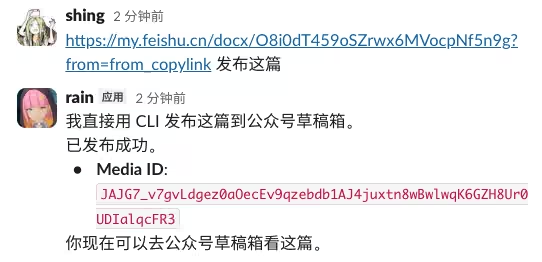
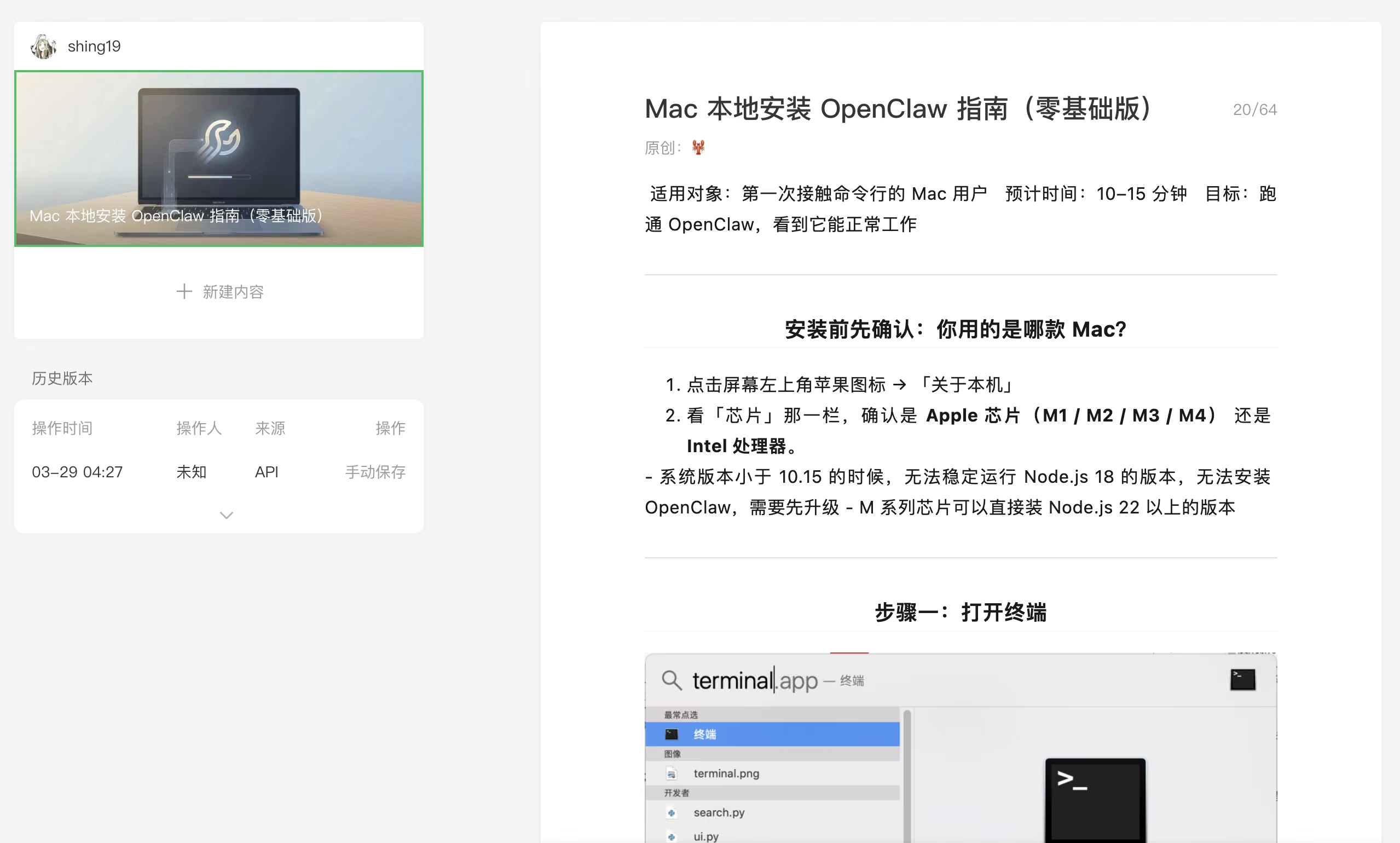
我最近用 OpenClaw 装了这个 skill 做了一次真实测试:直接把飞书文章链接发给它,它就自动调用这个 CLI,把文章送进了微信公众号草稿箱。
整个流程实际跑下来,不到一分钟。
更有意思的是,文章原本的作者字段里写的是“一作”,结果 OpenClaw 在发送时把它改成了 🦞,最后公众号草稿里显示成了“原创:🦞”。
这种小插曲很有意思。一方面说明这条自动化链路已经能跑通,另一方面也能看到,当文档、Agent、CLI 和发布渠道串起来以后,会出现一些非常鲜活的工作流细节。
4. 核心功能
目前已经支持:
- 从飞书
wiki/docx抓取 Markdown - 自动下载飞书正文图片并上传到微信素材库
- 直接发布到微信公众号草稿箱
- 支持本地 Markdown 发布,不强依赖飞书
- 缺封面时可选自动生成封面图
- 提供
serve模式,可以作为 HTTP 服务接入自己的自动化流程
5. 使用方式
例如,直接发布飞书文档:
feishu-wechat publish \
  --feishu "https://xxx.feishu.cn/wiki/xxxx" \
  --article-author "Your Name"
如果想连封面一起处理:
feishu-wechat publish \
  --feishu "https://xxx.feishu.cn/wiki/xxxx" \
  --auto-cover
如果阮老师觉得这个工具对“飞书写作 + 公众号发布”这个场景有帮助,欢迎收录。
- Dominant language
- No language data
- Stars
- 103k
- Forks
- 4.4k
- Avg merge
- 19h 39m
- Merged PRs (30d)
- 10
Contributor guide
No contributing guide indexed for this repository
First steps
- Read the whole issue, then the project's contributing guide.
- Comment on the issue to say you are picking it up — it saves two people doing the same work.
- Fork the repository and make your change on a branch.
- Open a pull request that references the issue number.
More from ruanyf/weekly
-
Difficulty 2/5 1-3 hours Newbie friendliness 72/100
-
Difficulty 1/5 Under an hour Newbie friendliness 65/100
-
Difficulty 2/5 1-3 hours Newbie friendliness 65/100
-
Difficulty 1/5 Under an hour Newbie friendliness 72/100
-
Difficulty 1/5 Under an hour Newbie friendliness 62/100
Similar issues
-
community first-timers-only good first issue hacktoberfest help wanted low hanging fruit up-for-grabs
Difficulty 1/5 Under an hour Newbie friendliness 95/100
-
Ecosystem: ClawMetry — the Qwen Code reader is now free and open source (follow-up to #9294 / #9338) Opencategory/integration priority/P3 scope/documentation status/ready-for-human type/feature-request
Difficulty 1/5 Under an hour Newbie friendliness 84/100
-
Difficulty 2/5 1-3 hours Newbie friendliness 76/100
TheOdinProject/curriculum#31408 ·
-
archived coursework help wanted scope: curriculum
Difficulty 2/5 1-3 hours Newbie friendliness 88/100
freeCodeCamp/freeCodeCamp#70260 · 1 comment ·
-
雪鸿集 Open待处理 申请收录
Difficulty 1/5 Under an hour Newbie friendliness 72/100
travellings-link/travellings#4000 · 1 comment ·