Firefox zoom implementation breaks position: fixed elements in Docs
#16.774 aberto em 24 de nov. de 2021
Métricas do repositório
- Stars
- (89.909 estrelas)
- Métricas de merge de PR
- (Mesclagem média 7d 22h) (184 fundiu PRs em 30d)
Description
Describe the bug
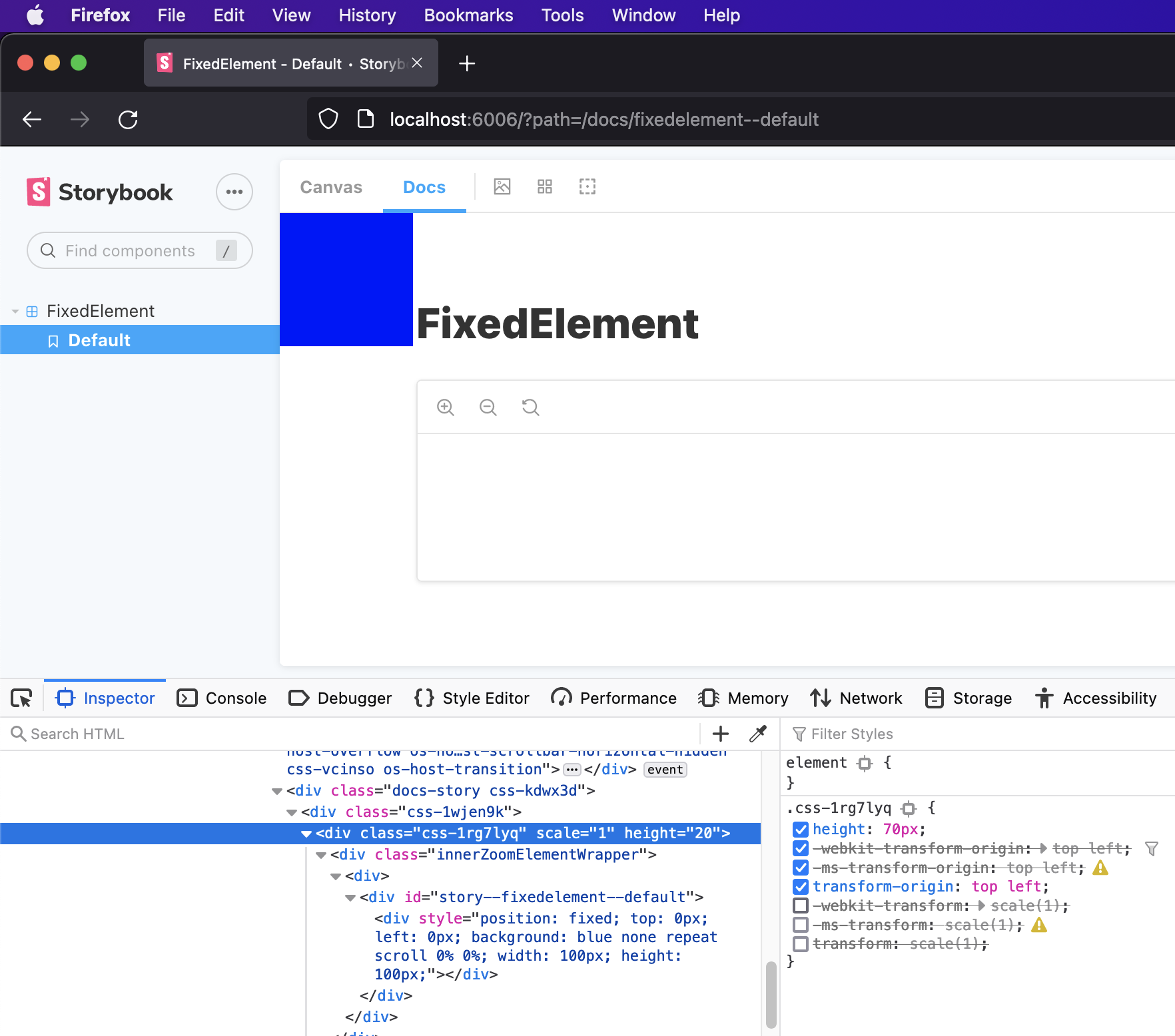
In Firefox, the zoom feature uses transform styles (see https://github.com/storybookjs/storybook/pull/12845) - unfortunately this breaks positioning on elements that require position: fixed when in the "Docs" view.
Normally a position: fixed element's position would correspond to the viewport but in Firefox it corresponds to the element with the transform style.
The issue is present regardless of actually using the zoom feature. I have tried to disable the zoom feature (related feature request: https://github.com/storybookjs/storybook/issues/16771) in the hopes that it might also remove the styling used for zoom, however, the styling remains.
To Reproduce I created a simplified reproduction of the issue here: https://github.com/idesigncode/bug-storybook-firefox-position-fixed
To view the issue, open the story in Docs view in both Firefox and another browser.
System System: OS: macOS 12.0.1 CPU: (8) x64 Intel(R) Core(TM) i7-7820HQ CPU @ 2.90GHz Binaries: Node: 14.17.3 - ~/.nvm/versions/node/v14.17.3/bin/node Yarn: 3.1.0 - /usr/local/bin/yarn npm: 7.20.0 - ~/.nvm/versions/node/v14.17.3/bin/npm Browsers: Chrome: 96.0.4664.55 Edge: 95.0.1020.53 Firefox: 94.0.1 Safari: 15.1 npmPackages: @storybook/addon-actions: ^6.4.0-rc.7 => 6.4.0-rc.7 @storybook/addon-docs: ^6.4.0-rc.7 => 6.4.0-rc.7 @storybook/addon-essentials: ^6.4.0-rc.7 => 6.4.0-rc.7 @storybook/addon-links: ^6.4.0-rc.7 => 6.4.0-rc.7 @storybook/react: ^6.4.0-rc.7 => 6.4.0-rc.7
Additional context My actual use case is documenting a tooltip component that uses fixed positioning to stay within the window.
Here's some screenshots of the simplified example:
Chrome ✅

Firefox ❌

Firefox (with the transform style disabled) ✅