dotnet/winforms
The height of the "DropDown" list for the combobox control can't be reset default height after called the " comboBox1.Items.Clear();" method
Aberta
#339 aberto em 21 de jan. de 2019
:beetle: bug:construction: work in progresshelp wanted
Métricas do repositório
- Stars
- (4.100 estrelas)
- Métricas de merge de PR
- (Métricas PR pendentes)
Description
OS : RS4 X64+.Net 4.8.03316 VS : Dev16 d16.0stg 16.0 Preview 3 28505.103
More info:
- This issue can reproduce from VS Dev10 to Dev16.
- This issue can't reproduce when adding the following code to Form1.Designer.cs.
comboBox1.Items.AddRange(new object[] { "a", "b", "c", "d", "e" });
comboBox1.Items.Clear();
Steps to reproduce:
- Create a Winforms application.
- Drag a Combobox control to form designer.
- Add the following code to Form1.cs.
private void Form1_Load(object sender, EventArgs e)
       {
comboBox1.Items.AddRange(new object[] { "a", "b", "c", "d", "e" });
          comboBox1.Items.Clear();
}
Actual:
The height of the "DropDown" list for the combobox control can't be reset default height after called the " comboBox1.Items.Clear();" method.
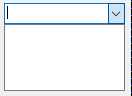
Expected:
The height of the "DropDown" list for the combobox control should be reset default height after called the " comboBox1.Items.Clear();" method.