dotnet/runtime
APP_POOL_WAS perfomanceCounter always returns 0
Aberta
#47.636 aberto em 29 de jan. de 2021
area-System.Diagnostics.PerformanceCounterbacklog-cleanup-candidatehelp wantedno-recent-activity
Métricas do repositório
- Stars
- (17.886 estrelas)
- Métricas de merge de PR
- (Mesclagem média 12d 11h) (661 fundiu PRs em 30d)
Description
Description
I trying to get uptime for IIS AppPool, but code always returns zero. Windows system monitor shows real values:
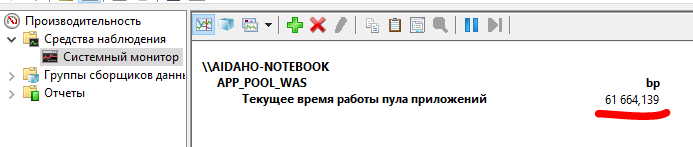
Code:
PerformanceCounterCategory cat = new PerformanceCounterCategory("APP_POOL_WAS");
string inst = cat.GetInstanceNames().First(x => x.Contains("bp"));
PerformanceCounter pc = cat.GetCounters(inst).First(x => x.CounterName == "Current Application Pool Uptime");
pc.NextValue(); //zero
Thread.Sleep(1000); //wait as recommended in msdn
float val = pc.NextValue(); //zero too
Configuration
aspnet core 3.1 (net 5.0 - same behavior) windows 10 x64, self-hosted
Expected behavior
Like as, for example, "System - System Up Time" Perfomance counter:
PerformanceCounter _upTimeCounter = new PerformanceCounter("System", "System Up Time");
_upTimeCounter.NextValue(); //zero
TimeSpan uptimeCounterValue = TimeSpan.FromSeconds(_upTimeCounter.NextValue()); //real expected value
Extended information
All counters in category "APP_POOL_WAS" with type PerformanceCounterType.ElapsedTime returns zero.
All others returns real values
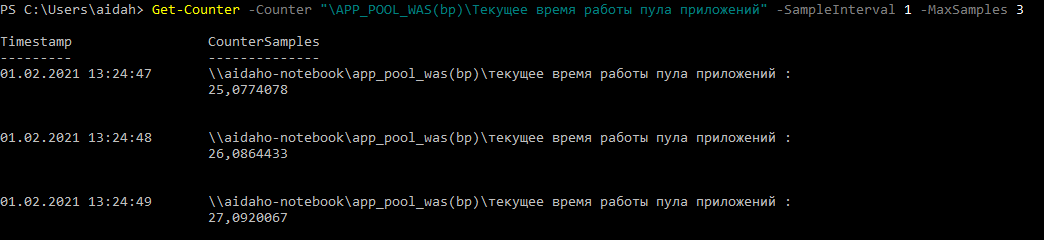
Maybe this is localization error, because in powershell we see localizaed names of counters