[7.8 Git Tools - Advanced Merging -- Reverse the commit ] may has some error description
Nobody has claimed this yet.
Assessment
- Difficulty
- 1/5
- Estimated time
- Under an hour
- Newbie friendliness
- 68/100
- Issue type
- Documentation
- Clarity
- Clearly specified
- Activity status
- Stale
- Tech stack
- git
- Domain
- documentation
Research direction
Open the linked Pro Git page and go to Git Tools - Advanced Merging, under “Reverse the commit.” Compare the sentence about the merge commit’s first parent with the described behavior, then correct the wording so it refers to C6 rather than HEAD; the documentation is done when the published text is accurate.
Written by the indexing model from the issue text.
Description
Which version of the book is affected?
all
Describe the bug:
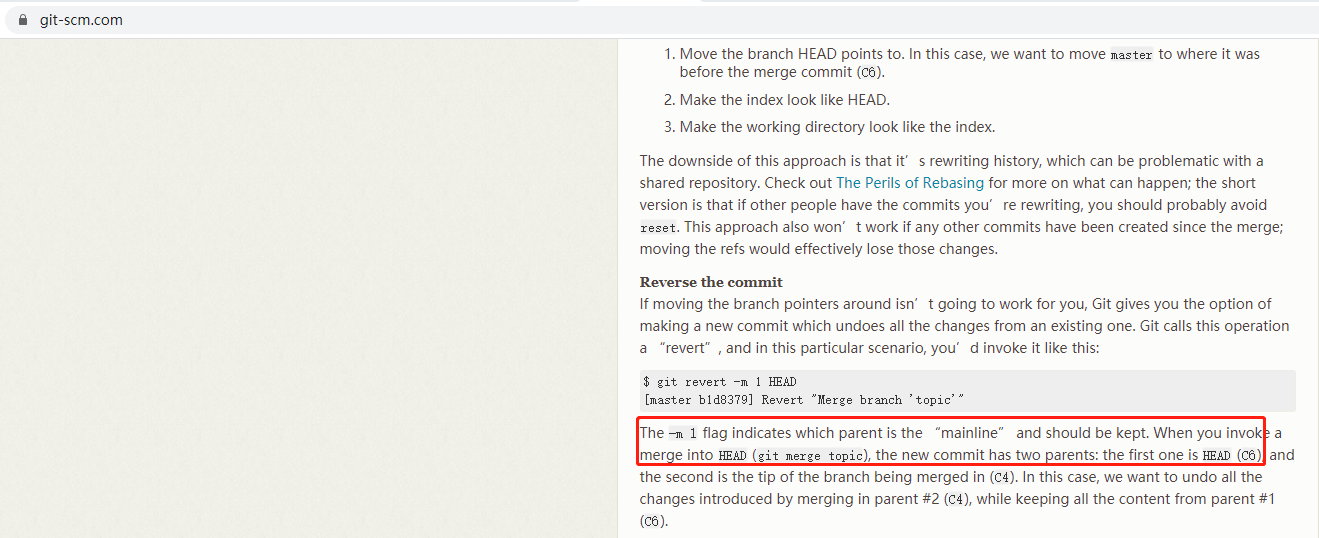
the description in [7.8 Git Tools - Advanced Merging -- Reverse the commit ] is:
"The -m 1 flag indicates which parent is the “mainline” and should be kept. When you invoke a merge into HEAD (git merge topic), the new commit has two parents: the first one is HEAD (C6)";
I think after the merge, this first parent is C6, right now the HEAD refs to M(the commit refs to merge), not C6
Steps to reproduce:
- Go to https://git-scm.com/book/en/v2/Git-Tools-Advanced-Merging
- Scroll down to 'Reverse the commit'
- you'll see what i descibed
Expected behavior:
where it said "When you invoke a merge into HEAD (git merge topic), the new commit has two parents: the first one is HEAD (C6)" should be "When you invoke a merge into HEAD (git merge topic), the new commit has two parents: the first one is C6"
Screenshots:
- Dominant language
- CSS
- Stars
- 6.6k
- Forks
- 2.1k
- PR merge metrics
- No merged PRs in 30d
Contributor guide
First steps
- Read the whole issue, then the project's contributing guide.
- Comment on the issue to say you are picking it up — it saves two people doing the same work.
- Fork the repository and make your change on a branch.
- Open a pull request that references the issue number.
More from progit/progit2
-
bug
Difficulty 2/5 1-3 hours Newbie friendliness 72/100
-
bug
Difficulty 2/5 1-3 hours Newbie friendliness 68/100
-
enhancement
Difficulty 1/5 Under an hour Newbie friendliness 82/100
-
enhancement
Difficulty 1/5 1-3 hours Newbie friendliness 65/100
-
enhancement
Difficulty 1/5 Under an hour Newbie friendliness 62/100
Similar issues
-
user-reported
Difficulty 2/5 1-3 hours Newbie friendliness 85/100
Kong/developer.konghq.com#7316 ·
-
Difficulty 2/5 1-3 hours Newbie friendliness 88/100
HarperFast/skills#96 ·
-
Difficulty 2/5 1-3 hours Newbie friendliness 82/100
infinispan/infinispan#18150 ·
-
bug triage:deciding
Difficulty 1/5 Under an hour Newbie friendliness 88/100
open-telemetry/otel-arrow#4132 ·
-
Ecosystem: ClawMetry — the Qwen Code reader is now free and open source (follow-up to #9294 / #9338) Opencategory/integration priority/P3 scope/documentation status/ready-for-human type/feature-request
Difficulty 1/5 Under an hour Newbie friendliness 84/100