Build on context menu not working
Nobody has claimed this yet.
Assessment
- Difficulty
- 3/5
- Estimated time
- 1-2 days
- Newbie friendliness
- 35/100
- Issue type
- Bug
- Clarity
- Mostly clear
- Activity status
- Stale
- Tech stack
- csharp, typescript
- Domain
- build-system, tooling
Research direction
Start at the context-menu Build path for tsconfig.json and inspect how it resolves the TypeScript compiler; compare that lookup with the missing tsc.exe path shown in the output. Reproduce the listed steps, and consider it done when Build launches the available compiler and completes the tsconfig.json build without the missing-file error.
Written by the indexing model from the issue text.
Description
Expected
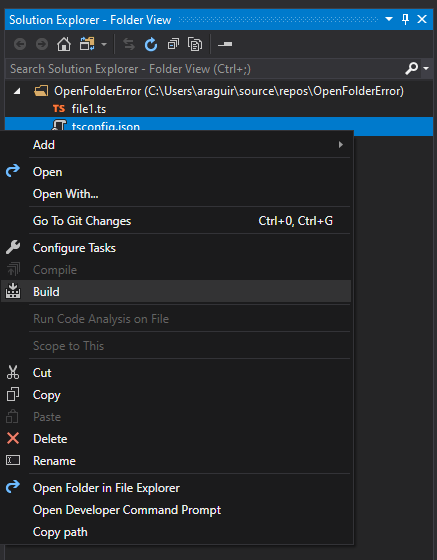
Command on context menu Build builds .ts files.
Actual Behavior
Command fails to execute as tsc.exe file no longer exists.
- NTVS Version: 1.5.10717.1 Commit Hash:c892fc71536f0cf66cc3c34359ae0b7e86fc0d6d
- Visual Studio Version: 16.3.0 Preview 2.0
- Node.js Version: 10.4.1
Steps to Reproduce
- Create a new folder on the file explorer.
- Open Visual Studio > File > Open > Folder
- Choose the newly created folder.
- Add a
tsconfig.jsonfile. - Right click the tsconfig.json > Build.
- See error on output Tsc.
=== Build Started: C:\Program Files (x86)\Microsoft SDKs\TypeScript\3.6\tsc.exe -p "C:\Users\user\source\repos\OpenFolderError\tsconfig.json" ===
System.ComponentModel.Win32Exception (0x80004005): The system cannot find the file specified
   at System.Diagnostics.Process.StartWithCreateProcess(ProcessStartInfo startInfo)
   at System.Diagnostics.Process.Start()
   at Microsoft.VisualStudioTools.Project.ProcessOutput..ctor(Process process, Redirector redirector)
Error - Failed to start 'C:\Program Files (x86)\Microsoft SDKs\TypeScript\3.6\tsc.exe'
- Dominant language
- C#
- Stars
- 1.8k
- Forks
- 355
- PR merge metrics
- No merged PRs in 30d
Contributor guide
First steps
- Read the whole issue, then the project's contributing guide.
- Comment on the issue to say you are picking it up — it saves two people doing the same work.
- Fork the repository and make your change on a branch.
- Open a pull request that references the issue number.
More from microsoft/nodejstools
-
microsoft/nodejstools#2523 · 1 reaction · 1 assignee ·
-
Difficulty 5/5 Over a week Newbie friendliness 25/100
microsoft/nodejstools#2519 · 1 comment ·
-
Difficulty 5/5 Over a week Newbie friendliness 15/100
microsoft/nodejstools#2517 ·
-
Difficulty 3/5 1-2 days Newbie friendliness 25/100
microsoft/nodejstools#2514 ·
-
Difficulty 3/5 1-2 days Newbie friendliness 35/100
microsoft/nodejstools#2513 · 5 comments ·
All issues in microsoft/nodejstools
Similar issues
-
Difficulty 2/5 1-3 hours Newbie friendliness 78/100
nightscout/nocturne#1379 ·
-
priority-0
Difficulty 2/5 1-3 hours Newbie friendliness 68/100
-
Difficulty 1/5 Under an hour Newbie friendliness 78/100
StackExchange/StackExchange.Redis#3249 ·
-
[Feat] 조합 영역 구분선 개선 Open
Difficulty 2/5 1-3 hours Newbie friendliness 68/100
-
documentation
Difficulty 2/5 1-3 hours Newbie friendliness 72/100