
microsoft/PowerToys
View on GitHub[Color Picker] Allow rounding to whole numbers for formats, example CIELAB
Open
#14,863 opened on Dec 6, 2021
Help WantedIdea-EnhancementProduct-Color Picker
Repository metrics
- Stars
- (133,154 stars)
- PR merge metrics
- (Avg merge 14d 20h) (117 merged PRs in 30d)
Description
Microsoft PowerToys version
0.51.1
Running as admin
- Yes
Area(s) with issue?
ColorPicker
Steps to reproduce
activate color checker (win+shift+c shortcut works fine) and mouse over screen color
✔️ Expected Behavior
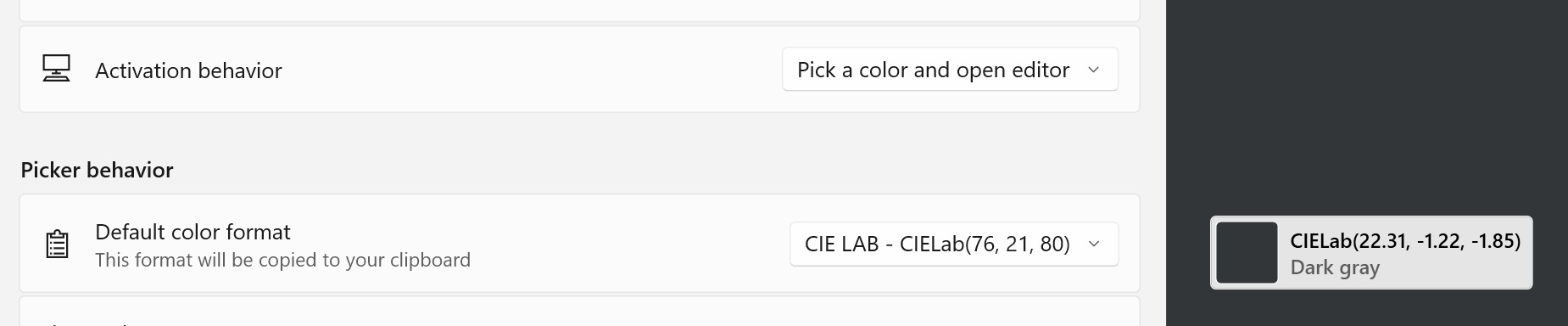
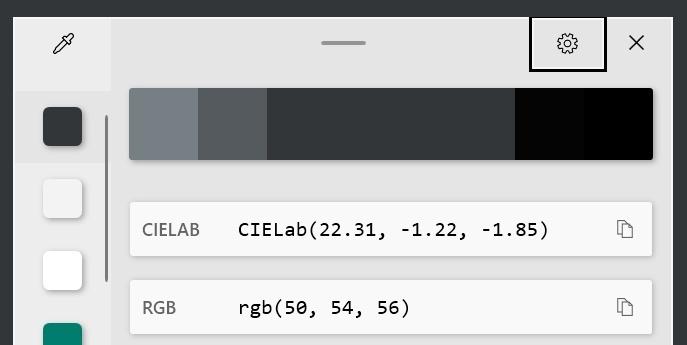
- To display CIELAB color as natural whole numbers per the color picker drop down choice in settings; see .jpg's
- When active, colors list display window is always able to be fully seen; regardless of mouse position on any screen
.
❌ Actual Behavior
-
Settings are set to display whole numbers; display shows decimal numbers.
-
If you position cursor at far right edge of any screen (I use 3 display monitors) part of the displayed colors list window is either cut-off on right side, or is overlapping next screen. Overlap is understandable and acceptable; however losing the display info on most farthest right screen makes color checking on far right edge useless. Other 3 monitor screen edges behave correctly. Decimal numbers display also contributes causing a larger width window.
Other Software
n/a