[Bug] [iOS13] A portion of the page is pushed off screen when using Large titles and SearchBar
#8,758 opened on 2019/12/05
Repository metrics
- Stars
- (5,644 個のスター)
- PR merge metrics
- (30d に merged PR はありません)
説明
Description
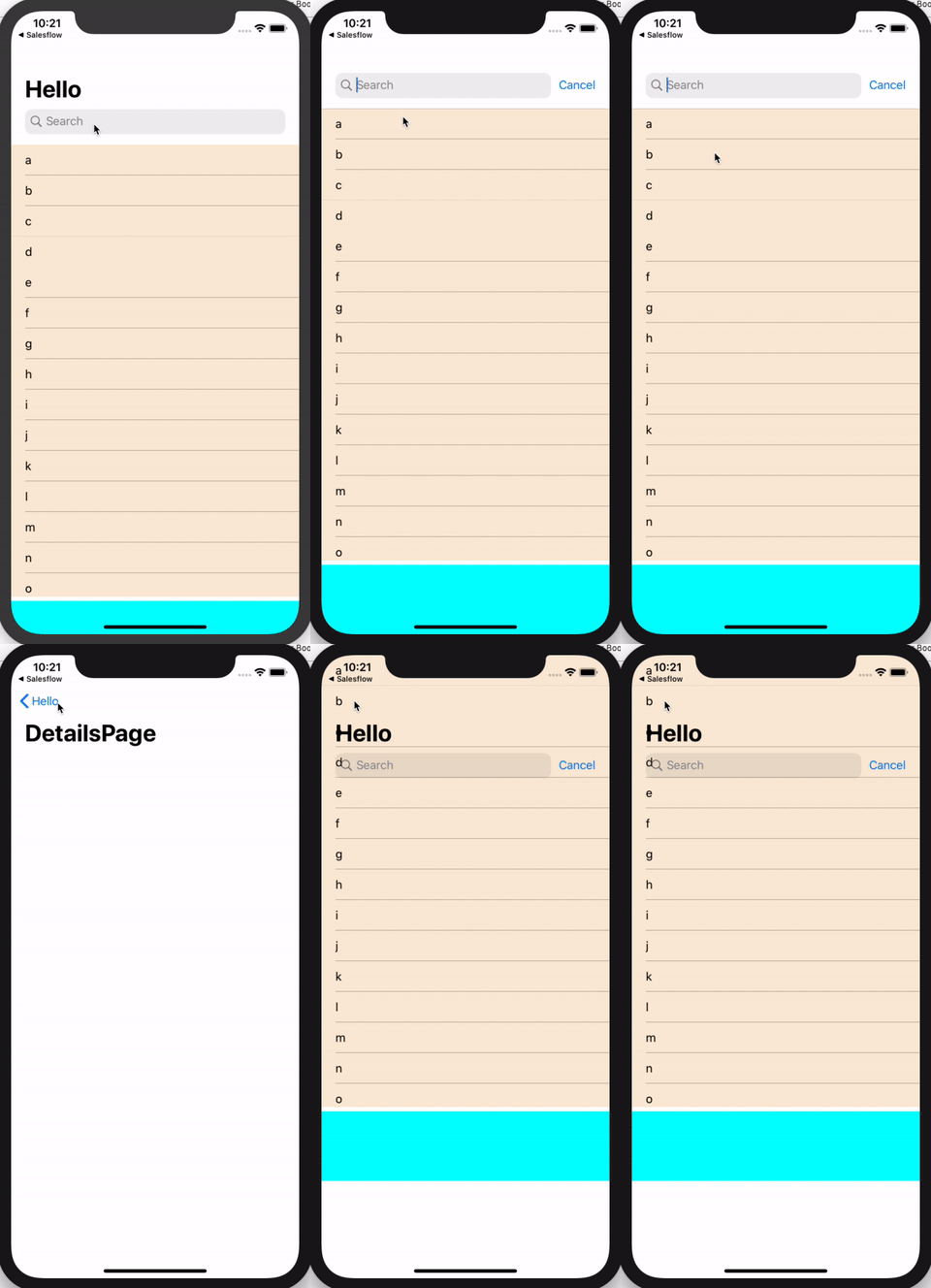
When using Large titles and a SearchBar in iOS 13, the bottom part of a page (SearchBar height?) is pushed off screen when using a listview and another view in a StackLayout. This is visible when scrolling the ListView up.
Example:
 Notice that the BoxView (height 100) is pushed off screen until scrolling up.
Code: App.xaml:
public App()
{
    InitializeComponent();

    var page = new Xamarin.Forms.NavigationPage(new MainPage());
    page.On<Xamarin.Forms.PlatformConfiguration.iOS>().SetPrefersLargeTitles(true);
    MainPage = page;
}
MainPage.xaml
<?xml version="1.0" encoding="utf-8"?>
<ContentPage
    xmlns="http://xamarin.com/schemas/2014/forms"
    xmlns:x="http://schemas.microsoft.com/winfx/2009/xaml"
    xmlns:d="http://xamarin.com/schemas/2014/forms/design"
    xmlns:mc="http://schemas.openxmlformats.org/markup-compatibility/2006"
    xmlns:ios="clr-namespace:Xamarin.Forms.PlatformConfiguration.iOSSpecific;assembly=Xamarin.Forms.Core"
    Title="Hello"
    NavigationPage.HasNavigationBar="True"
    ios:Page.LargeTitleDisplay="Automatic"
    mc:Ignorable="d"
    x:Class="Search.MainPage"
    x:Name="_rootPage">
    <StackLayout x:Name="_outerLayout">
        <ListView x:Name="_list" BackgroundColor="AntiqueWhite" HasUnevenRows="True" />
        <BoxView HeightRequest="100" BackgroundColor="Aqua" />
    </StackLayout>
</ContentPage>
MainPage.xaml.cs
public partial class MainPage : ContentPage
{
    public ObservableCollection<string> _data;

    public MainPage()
    {
        InitializeComponent();

        _data = new ObservableCollection<string>() { "a", "b", "c", "d", "e", "f", "g", "h", "i", "j", "k", "l", "m", "n", "o", "p", "q", "r", "s", "t", "u", "v", "w", "x", "y", "z" };
        _list.ItemsSource = _data;
    }
}
MainPageRenderer.cs
[assembly: ExportRenderer(typeof(MainPage), typeof(MainPageRenderer))]
namespace Search.iOS.CustomRenderers
{
    public class MainPageRenderer : Xamarin.Forms.Platform.iOS.PageRenderer, IUISearchControllerDelegate
    {
        private UISearchController _searchController;

        public override void WillMoveToParentViewController(UIViewController parent)
        {
            base.WillMoveToParentViewController(parent);
            SetSearchController(parent);
        }

        void SetSearchController(UIViewController parent)
        {
            _searchController = new UISearchController(searchResultsController: null);

            _searchController.HidesNavigationBarDuringPresentation = false;
            _searchController.DimsBackgroundDuringPresentation = false;
            _searchController.SearchBar.SearchBarStyle = UISearchBarStyle.Minimal;
            _searchController.AutomaticallyAdjustsScrollViewInsets = false;
            _searchController.Delegate = this;

            parent.NavigationItem.HidesSearchBarWhenScrolling = false;
            parent.NavigationItem.SearchController = _searchController;
        }
    }
}
Steps to Reproduce
- Pull and run https://github.com/GerhardSchreurs/SearchDemo in iOS
- Observe and scroll
Expected Behavior
I should see the whole BoxView after launch
Actual Behavior
I only see a part of the BoxView after launch. When scrolling down, the whole BoxView is visible, when scrolling fully up, part of the BoxView disappears
Basic Information
- Version with issue: iOS 13
- Last known good version: iOS 12
- IDE: Visual Studio for Mac
Screenshots
This shows the expected result and actual result after launch

Reproduction Link
https://github.com/GerhardSchreurs/SearchDemo
Please note...
If this is not a bug (I'm unaware if this same problem would arise when creating a same app using Xcode only), and there are workarounds / settings / flags that circumvent the described problem, please let me know. But as stated, this does not occur in iOS 12.
====================
Addendum:
I updated the repository to showcase the following: Watch what happens when you focus the SearchBar, navigate to a details page and navigate back: