
xamarin/Xamarin.Forms
[Bug] [iOS] Secondary ToolbarItems are added to regular Toolbar instead a secondary Toolbar
オープン
#8,422 opened on 2019/11/07
e/3 :clock3:help wantedin-progressinactivep/iOS 🍎t/bug :bug:up-for-grabs
Repository metrics
- Stars
- (5,644 個のスター)
- PR merge metrics
- (30d に merged PR はありません)
説明
Description
Bug is on iOS only. Traditionally, XF creates a secondary Toolbar to render ToolbarItems marked as "Secondary". When using Shell, XF does not create the seondary Toolbar, it adds all ToolbarItems to the main Toolbar.
Steps to Reproduce
- Create a new Shell project. When using the standard template, the created Pages and ViewModels can be removed. Only one Page is needed.
- Add a ContentPage (i.e. MainPage) if you deleted all pages.
- Add a toolbar Item with Order "Primary" and one with Order "Secondary"
- Add one Flyout Item with a ShellContent to the AppShell. Use MainPage for this ShellContent as DataTemplate.
or as I did:
- Take the official Xamarin.Forms samples
- Add an AppShell.xaml and AppShell.xaml.cs
- Assign AppShell instance as MainPage in App.xaml.cs
- Define MainPage as FlyoutItem/ShellContent in AppShell.xaml
Runtime:
- Start App
- Go to the page with the Toolbar Items
Expected Behavior
The ToolbarItem with Order Primary is shown in Toolbar. The ToolbarItem with Order Secondary is shown in a Secondard Toolbar below the regular Toolbar
Actual Behavior
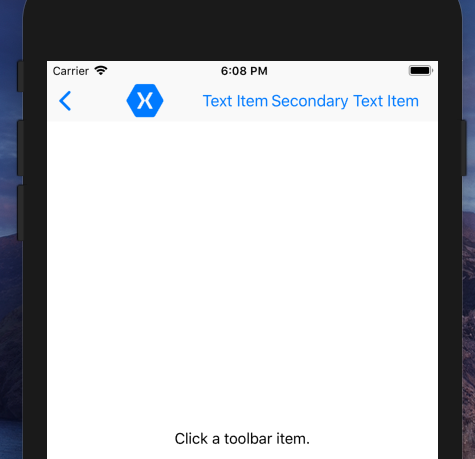
ToolbarItem with Order Primary and Secondary are shown in the regular Toolbar. No secondard Toolbar is shown.
Basic Information
- Version with issue: 4.2.0.709249 / 4.3.0.947036
- Last known good version: n/a
- IDE: Visual Studio 2019 (16.3.8)
- Platform Target Frameworks:
- iOS: XCode 11.1 (cannot update to XCode 11.2, update crashes for whatever reason), iOS 12.0, 12.4
- Device: Simulator with iOS 12.0 and iPhone 6 Plus with 12.4.1
Screenshots
Secondary Toolbar without using Shell:

Toolbar with using Shell:
Reproduction Link
ToolbarItemDemos with Shell.zip
Recommendations for alternative?
Any recommendations for a nice alternative are very welcome as well.