
[Android] Wrong Entry Used When Wrapped In TableView
#7,141 opened on 2019/08/13
Repository metrics
- Stars
- (5,644 個のスター)
- PR merge metrics
- (30d に merged PR はありません)
説明
Description
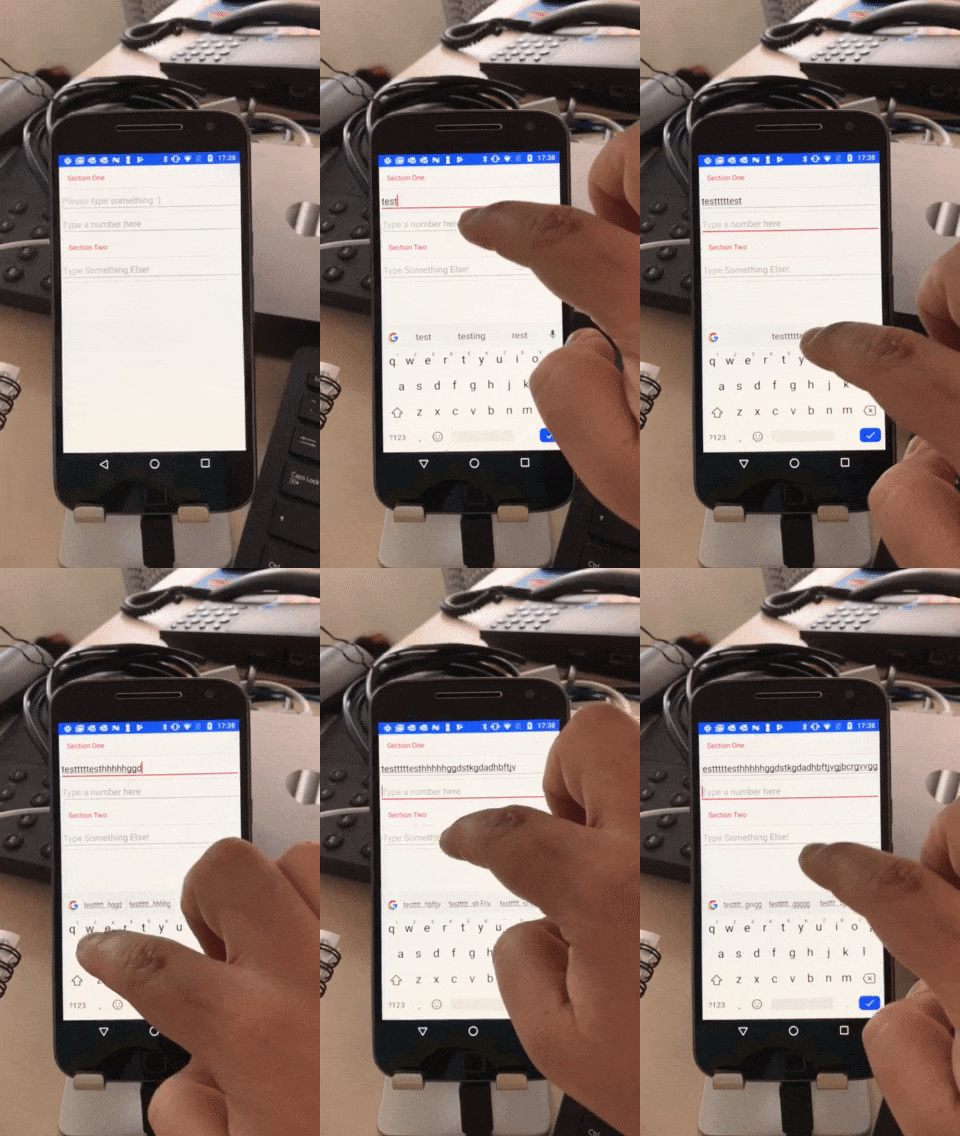
Consider a tableview with 2 cells, both of these cells are Entry's. The user can fill in the form and type whatever they want, in my case they are a name and a cash amount. After selecting and filling the first entry, tapping the second causes the new keyboard to popup and then immediately close (replaced by the old) and any text entered into the second entry is actually sent to the first.
I can currently only replicate this issue on my test phone, not on an emulator.
This bug only occurs on android,
Steps to Reproduce
- Create a
TableViewwith a number ofViewCell's each containing anEntry - Tap the first
Entryand enter something - Tap the next
Entry
Here is my sample code:
<TableView HasUnevenRows="True">
    <TableSection Title="Section One">
        <ViewCell>
            <Entry Keyboard="Default" Placeholder="Please type something :)"/>
        </ViewCell>

        <ViewCell>
            <Entry Keyboard="Numeric" Placeholder="Type a number here"/>
        </ViewCell>
    </TableSection>

    <TableSection Title="Section Two">
        <ViewCell>
            <Entry Keyboard="Default" Placeholder="Type Something Else!"/>
        </ViewCell>
    </TableSection>
</TableView>
Here is the same view but made from a StackLayout, note this displays the expected behaviour:
<StackLayout>
    <Entry x:Name="TextEntry" Placeholder="Please type something :)"/>
    <Entry x:Name="NumberEntry" Keyboard="Numeric" Placeholder="Type a number here"/>
</StackLayout>
Expected Behavior
The next Entry gets focussed, the keyboard associated with this Entry is displayed and any inputs to the keyboard are inserted into this Entry
Actual Behavior
The destination Entry's keyboard is displayed and then almost instantly dismissed for the original Entry's keyboard. Second Entry remains focussed, all inputs go into the first Entry
Basic Information
- Version with issue: 4.1.0.673156
- Last known good version: ?
- IDE: VS Mac 2019
- Platform Target Frameworks: Android 9.0 Pie
- Android: 9.0
- Android Support Library Version: 28.0.0.1
- Nuget Packages: (All out the box from vsmac blank template)
- Xamarin Forms 4.1.673156
- Xamarin.Android.Support.Core.Utils
- Xamarin.Android.Support.CustomTabs
- Xamarin.Android.Support.Design
- Xamarin.Android.Support.v4
- Xamarin.Android.Support.v7.AppCompat
- Xamarin.Android.Support.v7.CardView
- Xamarin.Android.Support.MediaRouter
- Affected Devices: Motorola 4G Nougat API 24
Screenshots
Emulator (Working)

Device (Not Working)
I do apologise for the image quality, I had to compress the gif tons to get it under 10mb!
Reproduction Link
Sample code provided (with the extra debug logging enabled) Table Cell Bug.zip
Some Investigating
I attached property changed events to the 2 Entry's and notice that when running on the device with an issue, they fired extra events. Here is the code:
public MainPage()
{
    InitializeComponent();

    TextEntry.PropertyChanged += TextEntry_PropertyChanged;
    NumberEntry.PropertyChanged += NumberEntry_PropertyChanged;
}

private void NumberEntry_PropertyChanged(object sender, PropertyChangedEventArgs e)
{
    Debug.WriteLine($"NumberEntry - PropertyChanged: {e.PropertyName}");

    if (e.PropertyName == "IsFocused")
    {
        Debug.WriteLine($"NumberEntry - IsFocussed: {NumberEntry.IsFocused}");
    }
}

private void TextEntry_PropertyChanged(object sender, PropertyChangedEventArgs e)
{
    Debug.WriteLine($"TextEntry - PropertyChanged: {e.PropertyName}");

    if (e.PropertyName == "IsFocused")
    {
        Debug.WriteLine($"NumberEntry - IsFocussed: {TextEntry.IsFocused}");
    }
}
And the application output:
>>>View Loading
 TextEntry - PropertyChanged: Renderer
 TextEntry - PropertyChanged: Width
 TextEntry - PropertyChanged: Height
 NumberEntry - PropertyChanged: Renderer
 NumberEntry - PropertyChanged: Width
 NumberEntry - PropertyChanged: Height
>>>First Entry Tapped and 2 taps on keyboard
TextEntry - PropertyChanged: IsFocused
NumberEntry - IsFocussed: True
TextEntry - PropertyChanged: Text
TextEntry - PropertyChanged: CursorPosition
TextEntry - PropertyChanged: Text
TextEntry - PropertyChanged: CursorPosition
>>>Second Entry Tapped
TextEntry - PropertyChanged: IsFocused
NumberEntry - IsFocussed: False
NumberEntry - PropertyChanged: IsFocused
NumberEntry - IsFocussed: True
NumberEntry - PropertyChanged: IsFocused
NumberEntry - IsFocussed: False
TextEntry - PropertyChanged: IsFocused
NumberEntry - IsFocussed: True
TextEntry - PropertyChanged: IsFocused
NumberEntry - IsFocussed: False
NumberEntry - PropertyChanged: IsFocused
NumberEntry - IsFocussed: True
[IInputConnectionWrapper] finishComposingText on inactive InputConnection
[IInputConnectionWrapper] getTextBeforeCursor on inactive InputConnection
[IInputConnectionWrapper] getSelectedText on inactive InputConnection
[IInputConnectionWrapper] getTextAfterCursor on inactive InputConnection
NumberEntry - PropertyChanged: IsFocused
NumberEntry - IsFocussed: False
TextEntry - PropertyChanged: IsFocused
NumberEntry - IsFocussed: True
TextEntry - PropertyChanged: IsFocused
NumberEntry - IsFocussed: False
NumberEntry - PropertyChanged: IsFocused
NumberEntry - IsFocussed: True
NumberEntry - PropertyChanged: IsFocused
NumberEntry - IsFocussed: False
TextEntry - PropertyChanged: IsFocused
NumberEntry - IsFocussed: True
TextEntry - PropertyChanged: IsFocused
NumberEntry - IsFocussed: False
NumberEntry - PropertyChanged: IsFocused
NumberEntry - IsFocussed: True
NumberEntry - PropertyChanged: IsFocused
NumberEntry - IsFocussed: False
TextEntry - PropertyChanged: IsFocused
NumberEntry - IsFocussed: True
TextEntry - PropertyChanged: IsFocused
NumberEntry - IsFocussed: False
NumberEntry - PropertyChanged: IsFocused
NumberEntry - IsFocussed: True