
Wayland/KDE Plasma 6: host transmits vertically-flipped (180°) screen to all clients on multi-GPU (amdgpu) host; OBS captures the same portal correctly
#15,526 opened on 2026年7月6日
Repository metrics
- Stars
- (114,209 stars)
- PR merge metrics
- (平均マージ 1d 23h) (30d で 60 merged PRs)
説明
Bug Description
On a Linux KDE Plasma 6 Wayland host, RustDesk captures and transmits the screen vertically flipped (the received image is inverted on both axes = rotated 180°: the top panel appears at the bottom, text reads mirrored). This happens on the capture/host side, not the viewer: the flipped image is sent to every client.
Key evidence that this is a RustDesk capture bug and not a compositor / GPU / display-configuration problem:
- The physical host display is correct.
kscreen-doctorreportsRotation: 1(normal) with an identity transform, and the desktop is displayed correctly on the local monitor. - OBS Studio captures correctly. OBS uses the same
xdg-desktop-portalPipeWire ScreenCast path on the same GPU and shows the desktop upright. This strongly suggests RustDesk's PipeWire consumer is ignoring the buffer's vertical-flip / transform metadata (theSPA_META_VideoTransform/ dmabuf y-invert flag) that OBS honors. - Two independent clients both show the flip (iOS and Android RustDesk), confirming the host is sending flipped frames rather than a viewer-side rendering bug.
This appeared after enabling VFIO GPU passthrough: the primary NVIDIA GPU was bound to vfio-pci, so the KDE desktop now renders on the secondary AMD iGPU (amdgpu). Before passthrough (desktop on the NVIDIA GPU) capture was upright. So the trigger seems to be the multi-GPU / amdgpu dmabuf capture path where the vertical-flip flag is not applied.
How to Reproduce
- Multi-GPU Linux host, KDE Plasma 6 Wayland session, desktop rendered by an AMD iGPU (amdgpu) (a second GPU is bound to
vfio-pcifor passthrough). - Run the RustDesk service and connect to this host from any client (tested: iOS and Android).
- Observe the remote screen: it is vertically flipped / rotated 180° (top panel at bottom, mirrored text).
- For comparison, capture the same host with OBS Studio via the KDE screen-cast portal → the image is upright.
Expected Behavior
RustDesk should transmit the screen in the correct orientation, honoring the PipeWire/dmabuf buffer transform (vertical-flip) flag exactly as OBS does, so the remote view matches the physical display.
Operating system(s) on local (controlling) side and remote (controlled) side
iOS / Android (controlling) -> CachyOS (Arch-based), Linux 7.1.3-1-cachyos, KDE Plasma 6.7.2 / KWin 6.7.2 Wayland, Mesa 26.1.4, desktop GPU = AMD Ryzen 7 9700X integrated GPU (amdgpu), discrete NVIDIA GPU bound to vfio-pci for passthrough (controlled)
RustDesk Version(s) on local (controlling) side and remote (controlled) side
iOS (latest, App Store) / Android (latest) -> 1.4.8 nightly build (also reproduced on 1.4.8-1 stable, Arch rustdesk-bin)
Screenshots
Screenshot from the iOS client:
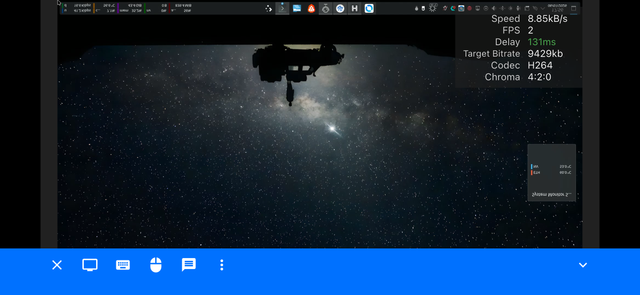
The entire remote desktop is rendered rotated 180° / vertically flipped:
- The KDE top panel runs along the top edge but its icons and text are upside-down and mirrored.
- The desktop wallpaper is inverted (the foreground object hangs down from the top instead of sitting at the bottom).
- A KDE System Monitor widget in the lower-right shows mirrored, upside-down text and sensor readings.
Crucially, RustDesk's own overlays are rendered upright by the client: the connection HUD in the top-right (Speed / FPS / Delay / Target Bitrate / Codec H264 / Chroma 4:2:0) and the bottom toolbar are correct. Only the captured/transmitted desktop stream is flipped, which localizes the bug to the host-side capture rather than the client renderer.
For reference, capturing the same host with OBS Studio via the same KDE screen-cast portal renders the desktop upright.
Additional Context
Things already tried on the host that did not fix it (documenting to save triage time):
- Disabling hardware codec (
enable-hwcodec = 'N') and forcing VP9 from the client → still flipped (rules out the NVENC/encoder path). - Updating to the nightly master build (1.4.8-0) → still flipped (no fix in current master).
- Forcing the Wayland/portal path via systemd env (
WAYLAND_DISPLAY, unsetDISPLAY) → RustDesk still logsDISPLAY=Ok(":1")and injects its own DISPLAY. - Attempting to force the memfd/SHM buffer path by breaking EGL (
__EGL_VENDOR_LIBRARY_FILENAMES,LIBGL_ALWAYS_SOFTWARE,MESA_LOADER_DRIVER_OVERRIDE) → still flipped (never black), so the flip also affects the non-dmabuf path or EGL still initialized. - Refreshing the ScreenCast permission: cleared
wayland-restore-tokeninRustDesk_local.tomland deleted the portal permission store (~/.local/share/flatpak/db/screencast), then re-granted the KDE screen-share prompt on reconnect → brand-new token, fresh negotiation, still flipped (rules out a stale restore token / stale output binding from before the passthrough change).
Log line confirming the capture path selection:
INFO [src/server.rs:582] DISPLAY=Ok(":1")
The reproducer is reliable and OBS provides a clean reference implementation of the same portal capture rendered upright, so this should be fixable by applying the buffer's vertical-flip / transform flag in RustDesk's PipeWire capture consumer.