
palantir/blueprint
GitHub で見るDateRangePicker with singleMonthOnly enabled sometimes shows wrong month after selecting shortcut
Open
#4,526 opened on 2021年2月15日
P2Package: datetimeType: bughelp wanted
Repository metrics
- Stars
- (20,263 stars)
- PR merge metrics
- (平均マージ 43d 10h) (30d で 27 merged PRs)
説明
Environment
- Package version(s): v3.38
- Operating System: Linux/Windows
- Browser name and version: Google Chrome v88
Code Sandbox
https://codesandbox.io/s/blueprint-sandbox-forked-j4ooz?file=/src/index.tsx
Steps to reproduce
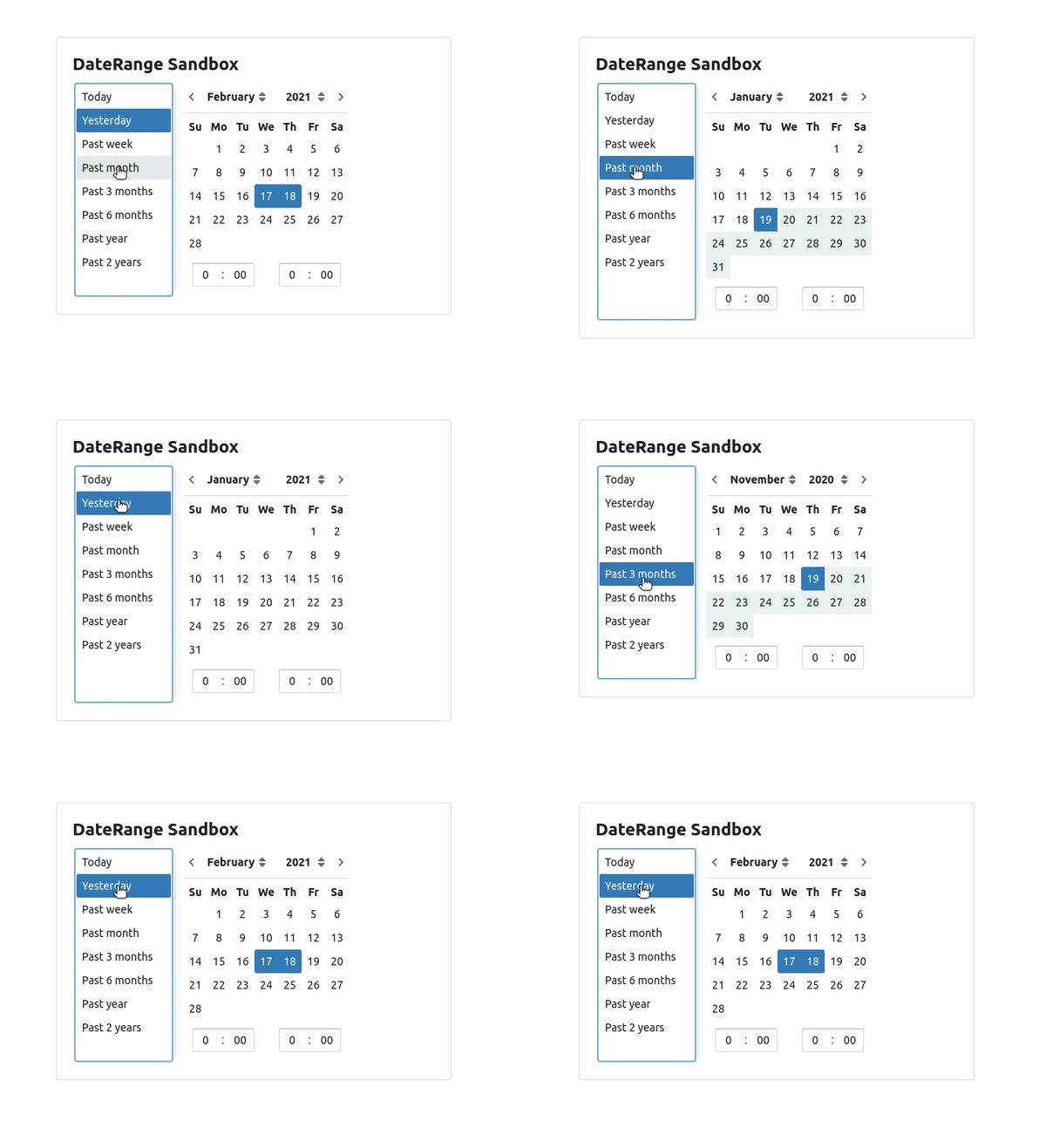
- Select (Past month) shortcut
- Select any of the smaller ranges shortcut from shortcut menu (Past week, Yesterday, Today)
- The selected range will not appear in the single month shown
Actual behavior
Selected range is inconsistent after toggling from past month to current week/day ranges from shortcut menu in single-month mode only.
Expected behavior
The calendar should show the month where the currently selected range is, instead of the previous one.
Possible solution
Not sure about the solution. Switching from past 3 month to current week/day works fine. Showing ending month as default may not also not be a correct solution as for higher ranges(6month,1 year), it will show the current month.