
Windows: the window opens at the wrong Y and Z position if icon is in tray menu
#264 opened on 2020年1月25日
Repository metrics
- Stars
- (6,778 stars)
- PR merge metrics
- (PR metrics pending)
説明
Description
It opens right at the bottom of the screen even if the tray icon is in the tray menu (I'm not sure if this is the correct name) and it opens behind the tray menu (z-axis).
Steps to Reproduce the Problem
- Launch the app.
- Drag the tray icon into the tray menu or if that's where the tray icon appears when launched, that's fine too.
- Click the icon.
Expected Behaviour
The window opens vertically above the icon (when the taskbar is at the bottom of the screen anyway) and on top (z-axis) of the tray menu.
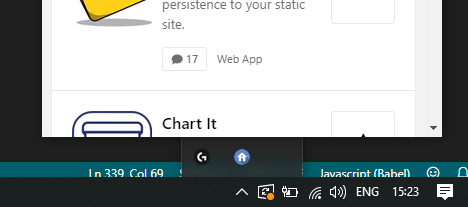
Actual Behaviour
The window is behind the tray menu (z-axis), and the bottom of the window is right up against the taskbar.

Specifications
- Menubar version: 7.2.0
- Platform: Windows 10 Pro (Insider Preview)
- Electron version: 7.1.9
Other information
I'm looking into fixing this now for our app. I have a proof of concept in which I:
- Set the window to be always on top.
- Manually hide it when the
focus-lostevent fires. - Comment out the .show call in menubar to prevent flicker.
- When the
after-showevent fires, I set the Y position based on where the tray is (i.e. tray bounds) and then show the window (viamenubar.window.show()).
I think there may be some other changes that I'm forgetting.
I'll try to get it to update the window position when the tray icon is dragged (there are some platform-specific events for this). Then I'll see how I can clean this up and move as much logic as possible into this library.
I'd love not to use alwaysOnTop so if you've any better ideas, let me know. window.moveTop() doesn't work.