
grommet/grommet
GitHub で見るBackground and border are not applied properly when rowDetails is set in DataTable
Open
#5,594 opened on 2021年9月14日
help wanted
説明
Expected Behavior
The values of the background and border properties should be applied to all cells of the table. When rowDetails is set, the values should also be applied to the autogenerated column (the column which contains buttons to expand and collapse detail rows) and the detail rows.
Actual Behavior
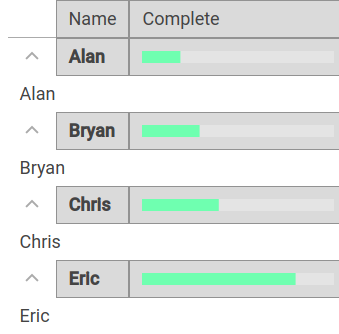
The values of the background and border properties are not applied to the autogenerated column and the detail rows.
URL, screen shot, or Codepen exhibiting the issue
Steps to Reproduce
The code below is based on the example given on the documentation page:
<DataTable
  background="light-6"
  border={true}
  columns={[
  {
    property: 'name',
    header: <Text>Name</Text>,
    primary: true,
  },
  {
    property: 'percent',
    header: 'Complete',
    render: datum => (
      <Box pad={{ vertical: 'xsmall' }}>
        <Meter
          values={[{ value: datum.percent }]}
          thickness="small"
          size="small"
        />
      </Box>
    ),
  },
  ]}
  data={[
    { name: 'Alan', percent: 20 },
    { name: 'Bryan', percent: 30 },
    { name: 'Chris', percent: 40 },
    { name: 'Eric', percent: 80 },
  ]}
  rowDetails={(row) => row.name}
/>
Your Environment
- Grommet version: 2.17.5
- Browser Name and version: Google Chrome 93.0.4577.82
- Operating System and version (desktop or mobile): Ubuntu 18.04.6 LTS