
NavLink should have a core set of classes and inactive ones rather than just tacking on "Active" ones.
#37,765 opened on 2021/10/21
Repository metrics
- Stars
- (37,933 個のスター)
- PR merge metrics
- (PR metrics pending)
説明
Currently the NavLink (https://github.com/dotnet/aspnetcore/blob/main/src/Components/Web/src/Routing/NavLink.cs) has a property called "ActiveClass". It should also have a property named "InactiveClass" so you can have a "core set" and then your inactive and active classes.
Here is an example. Say I have a link that would look like this when inactive
<a class="text-gray bg-dark-gray" />
But when active I want it to look like
<a class="text-white bg-dark-gray" />
In other words, I would like to change the color of the text depending if it is active or not. I am proposing the following look of component.
<NavLink class="bg-dark-gray" ActiveClass="text-white" InactiveClass="text-gray" />
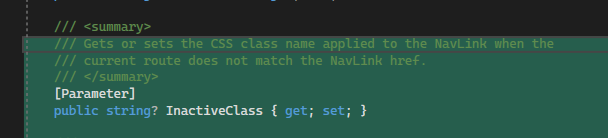
This is easily acomplishable by the following changes to NavLink.
- Adding a parameter
- changing
UpdateCssClass
This does NOT break any current functionality as people would likely just be tacking on the classes to the end. The issue with taking them on at the end is if you are using a CSS file, order matters within that for application.
I am happy to make a PR with this small change, that can help the NavLink be better!
Doesn't look any tests (that are currently written) are applicable to this. So only the component would need to be changed.