angular-ui/ui-grid
ui-grid-move-columns: Overlaps other grid columns after dragging far enough
クローズ
#6,603 opened on 2018/03/15
grid-move-columnshelp wanted
Repository metrics
- Stars
- (5,395 個のスター)
- PR merge metrics
- (PR metrics pending)
説明
I know this feature is still alpha, but I haven't found an issue around it.
ui-grid version: 4.0.2 browser: Vivaldi 1.14 (latest stable) also produce-able in Chrome. plunkr link
Steps to reproduce:
- Click the header column labeled "Id"
- Drag the id column to the right the right until about the "Extra 6" column.
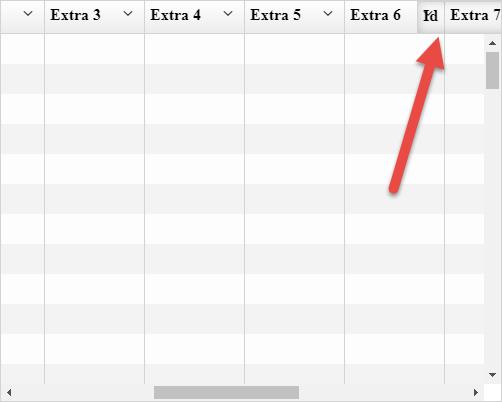
- Around this point you should get something that looks like the image attached and the Id column is then stuck at this point and overlaps the other columns and your dragging ability is lost.
Notes:
- Does not matter if it has the ui-grid-infinite-scroll or not, just as an added test point.
- Once you get this to happen once you can get them to pile up around that point if you drag columns from the far right and far left they normally get stuck around the same point.