xamarin/Xamarin.Forms
[Bug] Label gets lifted when TailTruncation is applied
Aperta
#8930 aperta il 17 dic 2019
e/3 :clock3:help wantedinactivep/Androidt/bug :bug:up-for-grabs
Metriche repository
- Star
- (5644 stelle)
- Metriche merge PR
- (Nessuna PR mergiata in 30 g)
Descrizione
Description
Label gets lifted when TailTruncation is applied
Steps to Reproduce
I've used the following code to reproduce the issue:
<Grid>
	<Grid.RowDefinitions>
		<RowDefinition Height="*" />
		<RowDefinition Height="*" />
		<RowDefinition Height="*" />
	</Grid.RowDefinitions>

	<FlexLayout Grid.Row="0" JustifyContent="SpaceBetween">
		<Label FlexLayout.Shrink="0" Text="Title:" />
		<Label LineBreakMode="TailTruncation" Text="Label Label Label Label Label Label Label Label Label" />
	</FlexLayout>
	<FlexLayout Grid.Row="1" JustifyContent="SpaceBetween">
		<Label FlexLayout.Shrink="0" Text="Title:" />
		<Label LineBreakMode="MiddleTruncation" Text="Label Label Label Label Label Label Label Label Label" />
	</FlexLayout>
	<FlexLayout Grid.Row="2" JustifyContent="SpaceBetween">
		<Label FlexLayout.Shrink="0" Text="Title:" />
		<Label LineBreakMode="HeadTruncation" Text="Label Label Label Label Label Label Label Label Label" />
	</FlexLayout>
</Grid>
Expected Behavior
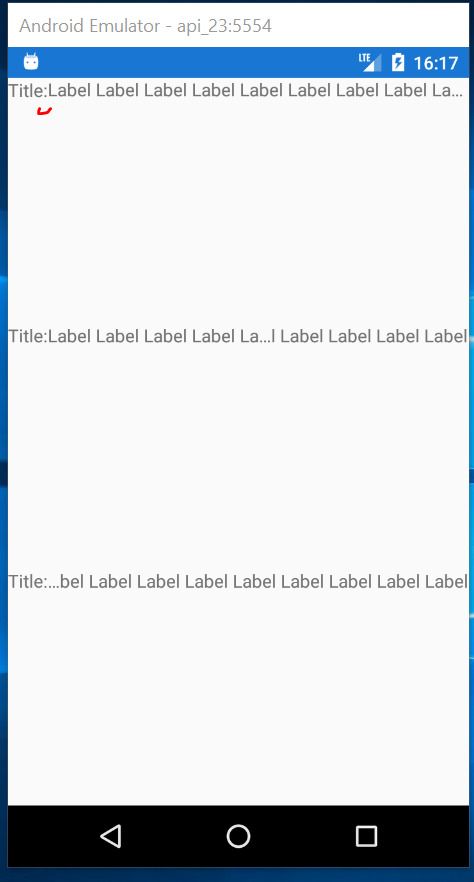
In my case, I expect the Label to not get lifted and remain on the same level as "Title:" as in rows where HeadTruncation and MiddleTruncation is used instead of TailTruncation
Actual Behavior
After applying TailTruncation, labels gets lifted
Basic Information
- Version with issue: 4.4.0.991265
- IDE: Visual Studio 2019 16.4.1
- Platform Target Frameworks:
- Android: API 23
Screenshots
Notice how the TailTruncated "Label Label Label..." is sligtly lifted in the first row after "Title:" when comparing it to the other two rows which use MiddleTruncation and HeadTrunctation