
FormattedString Span with Material Font not displaying correctly
#6824 aperta il 8 lug 2019
Metriche repository
- Star
- (5644 stelle)
- Metriche merge PR
- (Nessuna PR mergiata in 30 g)
Descrizione
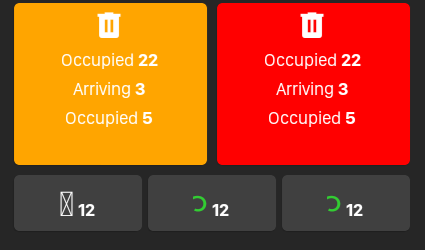
Setting Text as a Material Font is displaying invalid icon when being used in the Span of FormattedText but works fine without using FormattedText. Affected is Android Version 7.1, working fine is Android Version 5.1. Only tested on these devices.
Below is my XAML to demonstrate setup:
Shows Material Font Correctly:
<Label
         FontFamily="{StaticResource MaterialFontFamily}"
         FontSize="{StaticResource MaterialDesignIconFontSizeLg}"
          HorizontalOptions="Center"
          Text="{StaticResource AlarmMaterialDesignFont}"
          TextColor="White"
          VerticalOptions="Center"
          VerticalTextAlignment="Center" />
Does not show material font correctly:
<Label
         HorizontalOptions="Center"
         VerticalOptions="Center"
         VerticalTextAlignment="Center">
                <Label.FormattedText>
                     <FormattedString>
                          <FormattedString.Spans>
                                <Span
                                   FontFamily="{StaticResource MaterialFontFamily}"
                                   FontSize="{StaticResource MaterialDesignIconFontSizeLg}"
                                   Text="{StaticResource AlarmMaterialDesignFont}"
                                   TextColor="White" />
                                     <Span
                                        FontFamily="{StaticResource RegularFont}"
                                        FontSize="Medium"
                                         Text=" " />
                                      <Span
                                          FontFamily="{StaticResource BoldFont}"
                                          FontSize="Medium"
                                          Text="{Binding AlreadyCheckedIn}"
                                          TextColor="White" />
                             </FormattedString.Spans>
                       </FormattedString>
              </Label.FormattedText>
</Label>
FYI The trash icons in the following screenshots are using FontImageSource Glyph property which works fine
Expected Behavior
Galaxy Tab A (SM-T280) Android Version 5.1.1 with spans:

Actual Behavior
Below is Galaxy Tab A (SM-T355Y) - Android Version 7.1.1 with spans:
Basic Information
- Version with issue: 4.1.0.555618
- Last known good version:
- IDE: Microsoft Visual Studio Community 2019 Version 16.1.5
- Platform Target Frameworks:
- iOS: Untested
- Android: 9.0
- UWP: Untested
- Android Support Library Version: NA
- Nuget Packages:
- Affected Devices: Galaxy Tab A (SM-T355Y) Android Version 7.1.1.
- Unaffected Devices: Galaxy Tab A (SM-T280) Android Version 5.1.1.
I followed this link to setup fonts in my Xamarin Project: https://montemagno.com/using-font-icons-in-xamarin-forms-goodbye-images-hello-fonts/