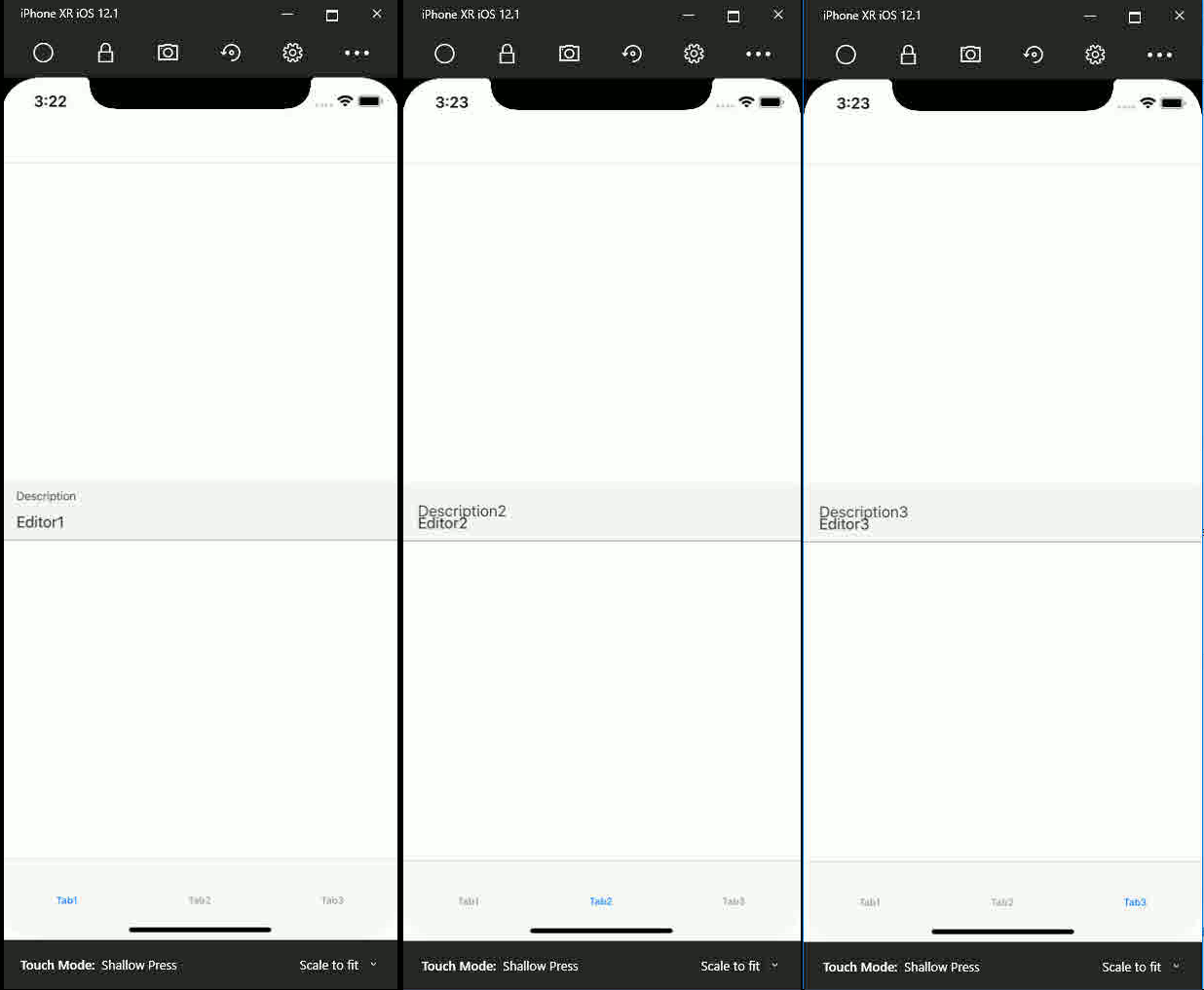
[Bug] Editor placeholder using Visual Material renders incorrectly
#6647 aperta il 25 giu 2019
Metriche repository
- Star
- (5644 stelle)
- Metriche merge PR
- (Nessuna PR mergiata in 30 g)
Descrizione
The Forms Editor placeholder using Visual Material renders incorrectly if used in more than on sub tab page
Description
The Xamarin Forms Editor placeholder string renders incorrect (the Placeholder text size stays the same size as Text-field text size, the Placeholder text is left tabbed and off-region) when: 1. Using the Xamarin Forms Editor component on multiple tab pages 2. When rendering on IOS, it renders fine on Android 3. The text field is pre-filled with data (single or multi-line, does not matter)
(An animated image showing the problem is attached)
Steps to Reproduce
- Create a Xamarin Forms Mobile app for Android and IOS. Add the Visual.Material nuget. Update the Forms and Visual.Material Nugets to latest.
- Create a startup tabbed page containing at least two sub-pages
- Place a single Editor component into a StackLayout on each tab page, set their Visual property to VisualMarker.Material
- Hardcode the Editor components Placeholder and Text properties with some data
- Add FormsMaterial.Init() to AppDelegate.cs
- Build for IOS and run on the simulator (e.g. iPhone XR -12.1)
- Notice the Editor component renders correctly in the first tab, then notice it renders incorrectly when navigating to any other tab.
(A simple sample project demonstrating the problem is attached)
Expected Behavior
The Editor component shall display the Placeholder text left-aligned and smaller as the main Text on the first line
Actual Behavior
The Editor component displays the Placeholder text clipped and the same size as the main Text on the first line
Basic Information
- Version with issue:
- Last known good version: Do not know
- IDE: Visual Studio Community 2019 Version 16.1.3
- Platform Target Frameworks:
- iOS: Xamarin.iOS and Xamarin.Mac SDK 12.10.0.153 (750a879)
- Android: N.A
- UWP: N.A
- Android Support Library Version: N/A
- Nuget Packages: Xamarin.Forms 4.1.0.496342, Xamarin.Forms.Visual.Material 4.1.0.496342
- Affected Devices: Only tried this on simulator with iPhone Xs iOS 12.2
Screenshots