microsoft/Terminal
Retro Terminal Effect looks bad with 125% screen scaling
Aperta
#10.132 aperta il 19 mag 2021
Area-RenderingHelp WantedIssue-BugPriority-3Product-Terminal
Metriche repository
- Star
- (103.173 stelle)
- Metriche merge PR
- (Merge medio 27g 19h) (24 PR mergiate in 30 g)
Descrizione
Windows Terminal version (or Windows build number)
1.7.1033.0
Other Software
No response
Steps to reproduce
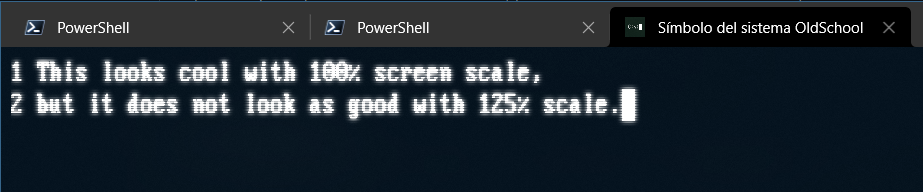
The Retro Terminal Effect looks very nice with 100% screen scaling (selected in Windows Screen settings), but looks a little bit off when screen scaling is set to 125% (which is the default on my 1920*1080 laptop screen). With 100% screen scaling, the "scan lines" look evenly distributed, but they do not with 125% scaling. I'm attaching screenshots with both scaling factors in the "Expected behavior" and "Actual behavior" sections for comparison.
Expected Behavior
The expected behavior would be evenly distributed scan lines at any screen scaling setting, as seen on this screenshot at 100% scaling:

Actual Behavior
The scan lines look uneven at 125% screen scaling, as seen on this screenshot: