
Metriche repository
- Star
- (13.886 star)
- Metriche merge PR
- (Merge medio 25g 3h) (22 PR mergiate in 30 g)
Descrizione
Edited to clarify.
#RenderTargetCube requires a LH view matrix. In order to build a proper matrix that will match a cubemapface direction.
GraphicsDevice.SetRenderTarget(renderTargetCube, CubeMapFace.NegativeZ); // front
You cannot match the above call to a Matrix.CreateWorld(...) or CreateLookAt(...) resulting matrix.
There is,... No combination of up vector and forward vector as input paremeters that will create a good view render that will match the output from within a shader to the follwing call.
float shadowDepth = texCUBE(TextureSamplerB, float4(lightToPixelDir, 0)).x;
Your output will be scrambled in some form no matter what you do. This is about the best you can get with a rh monogame create call.
Since monogames matrix's are right handed this is extremely obfusicated. It makes the use of the rendertargetcube itself impossible without knowing this. Once you know it, you still need the following to create a compatible matrix. In order to get a view that will match a cubeface.
thanks to markus for figuring out that the solution was a inverse matrix and the suggestion to change the current monogame rh to a lh.
With some minor adjustments i made to Monogames CreateLookAt and testing over the last week this appears to be solid.
rendertargetcube intellisense should bring it up and it should be pretty clear what it does. .
    public static class RenderTargetCubeHelper
    {
        public static Matrix CreateCubeFaceLookAtViewMatrix(Vector3 cameraPosition, Vector3 cameraTarget, Vector3 cameraUpVector)
        {
            var vector = Vector3.Normalize(cameraPosition - cameraTarget);
            var vector2 = -Vector3.Normalize(Vector3.Cross(cameraUpVector, vector));
            var vector3 = Vector3.Cross(-vector, vector2);
            Matrix result = Matrix.Identity;
            result.M11 = vector2.X;
            result.M12 = vector3.X;
            result.M13 = vector.X;
            result.M14 = 0f;
            result.M21 = vector2.Y;
            result.M22 = vector3.Y;
            result.M23 = vector.Y;
            result.M24 = 0f;
            result.M31 = vector2.Z;
            result.M32 = vector3.Z;
            result.M33 = vector.Z;
            result.M34 = 0f;
            result.M41 = -Vector3.Dot(vector2, cameraPosition);
            result.M42 = -Vector3.Dot(vector3, cameraPosition);
            result.M43 = -Vector3.Dot(vector, cameraPosition);
            result.M44 = 1f;
            return result;
        }
        public static Matrix GetRenderTargetCubeProjectionMatrix(float near, float far)
        {
            return Matrix.CreatePerspectiveFieldOfView((float)MathHelper.Pi * .5f, 1, near, far);
        }
    }
The additional method brings to light a second secret the aspect ratio for the perspective projection that is used for the rendertarget cube must be 1.
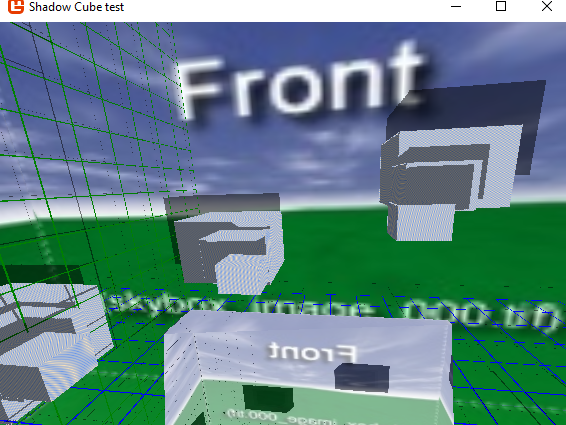
I hope its clear that the average user will not figure this out on his own from the documentation or without the help of someone who knows or without extensive testing to find the bug.
The bug in this case is the design of the class itself in just how un-available any clues are to this vital bit of information or what the fix is..
I leave it to you to solve how best to deal with it. If there is no simple solution i suggest simply adding the method to the class itself when the user hits a dead end, it will be right were they will likely, look first.
System stats Dx12 caps
What version of MonoGame does the bug occur on: MonoGame 3.7
What operating system are you using: Windows 10
What MonoGame platform are you using: DesktopGL, WindowsDX