
ipfs/ipfs-desktop
Import file modal doesn't stay open when switching apps
Open
#2,182 opened on Jun 20, 2022
P2effort/dayshelp wantedkind/bugstatus/readytopic/design-front-end
Repository metrics
- Stars
- (5,632 stars)
- PR merge metrics
- (PR metrics pending)
Description
- OS: macOS Monterey 12.4 (21F79)
- Version of IPFS Desktop: 0.21.0
- UI v2.15.0
- Revision fadd900
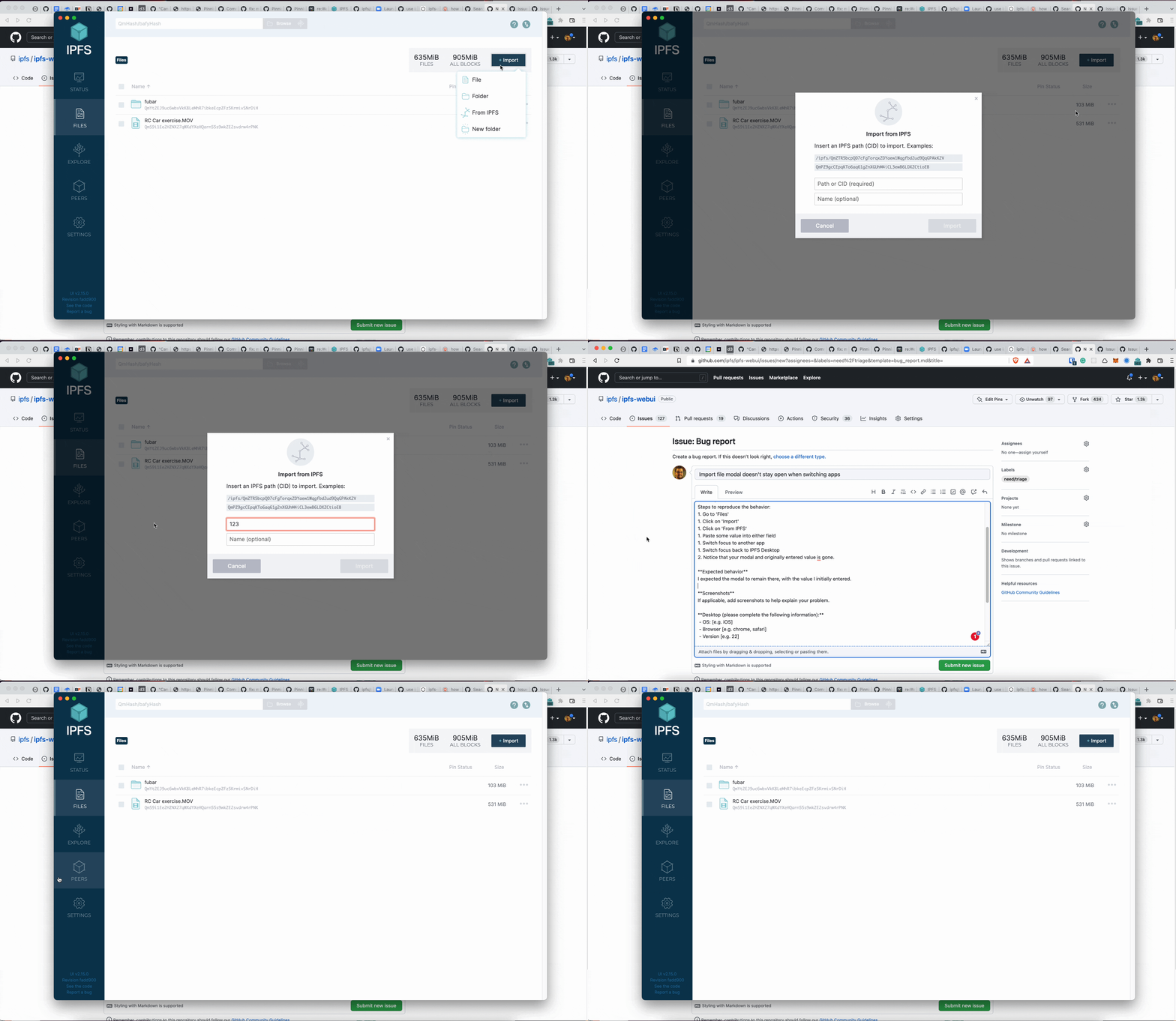
Describe the bug I was attempting to import a file from IPFS when I noticed this error because I had to switch back to my browser to copy the CID and name. After pasting one of the values, switching to the browser, copying the other value, and switching back to IPFS Desktop, the modal with the first value is still there, but immediately gets removed. This shouldn't happen.
To Reproduce Steps to reproduce the behavior:
- Go to 'Files'
- Click on 'Import'
- Click on 'From IPFS'
- Paste some value into either field
- Switch focus to another app
- Switch focus back to IPFS Desktop
- Notice that the modal and originally entered value is gone.
Expected behavior I expected the modal to remain there, with the value I initially entered.
This bug does not happen in ipfs-webui (tested at localhost:5001)
Screenshots
Additional context error.log