Build script terminated unexpectedly
Nobody has claimed this yet.
Assessment
- Difficulty
- 2/5
- Estimated time
- 1-3 hours
- Newbie friendliness
- 64/100
- Issue type
- Bug
- Clarity
- Mostly clear
- Activity status
- Quiet
- Tech stack
- python
- Domain
- build-system
Research direction
Start at line 387 of src/coreclr/build-runtime.cmd and reproduce the Windows build with depot_tools on PATH, focusing on the Python detection command and its interaction with python3.bat. Compare the behavior with the reported call workaround. Done means the batch file continues after Python detection, native C++ build steps execute, and build.cmd does not falsely report success.
Written by the indexing model from the issue text.
Description
Description
The python installation detection method in src/coreclr/build-runtime.cmd line 387 might cause batch file to stop unexpectedly without any error., which causes build steps not fully executed and build.cmd falsely reports successful build.
REM Find python and set it to the variable PYTHON
set _C=-c "import sys; sys.stdout.write(sys.executable)"
(py -3 %_C% || py -2 %_C% || python3 %_C% || python2 %_C% || python %_C%) > %TEMP%\pythonlocation.txt 2> NUL
set _C=
set /p PYTHON=<%TEMP%\pythonlocation.txt
I installed chromium depot_tools, added to path, and above code in build-runtime.cmd will terminate batch execution silently after finding python3.bat in depot_tools
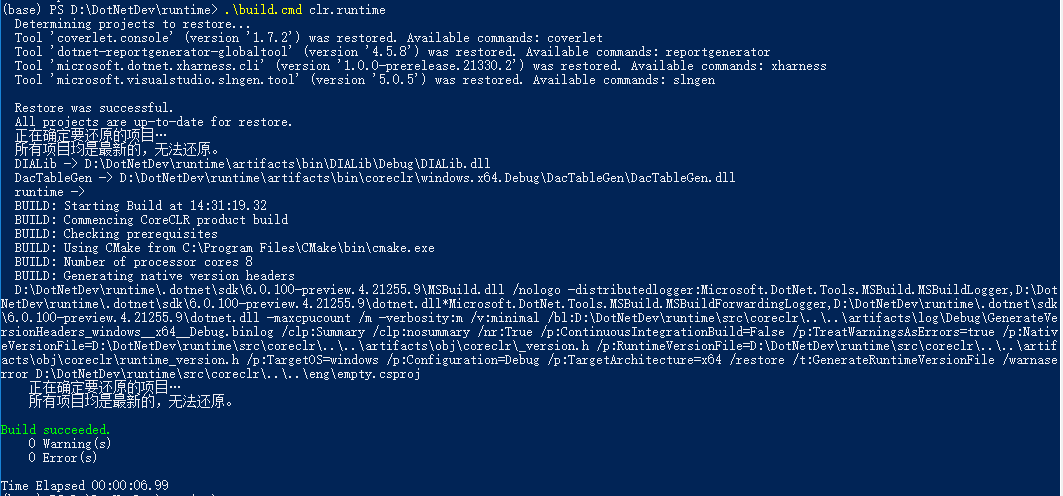
Image shows no native cpp code is compiled and build.cmd falsely reports build succeeded
Configuration
OS : Windows 10 pro x64
dotnet SDK : 5.0.7 (Maybe not relevant)
Regression?
Tried master, 6.0preview5 and 5.0.7, all suffers from this issue
Other information
adding call before
(py -3 %_C% || py -2 %_C% || python3 %_C% || python2 %_C% || python %_C%) > %TEMP%\pythonlocation.txt 2> NUL
seems to help
- Dominant language
- C#
- Stars
- 18.3k
- Forks
- 5.6k
- Avg merge
- 2d 19h
- Merged PRs (30d)
- 589
Contributor guide
First steps
- Read the whole issue, then the project's contributing guide.
- Comment on the issue to say you are picking it up — it saves two people doing the same work.
- Fork the repository and make your change on a branch.
- Open a pull request that references the issue number.
More from dotnet/runtime
-
agentic-workflows untriaged
Difficulty 2/5 1-3 hours Newbie friendliness 76/100
-
area-System.Reflection blocking-clean-ci-optional Known Build Error os-mac-os-x untriaged
Difficulty 2/5 1-3 hours Newbie friendliness 68/100
-
area-CodeGen-coreclr untriaged
Difficulty 1/5 Under an hour Newbie friendliness 92/100
-
agentic-workflows untriaged
Difficulty 1/5 Under an hour Newbie friendliness 78/100
-
area-VM-meta-mono untriaged
Difficulty 2/5 1-3 hours Newbie friendliness 72/100
Similar issues
-
type/automation type/tech-debt
Difficulty 2/5 1-3 hours Newbie friendliness 78/100
-
bug
Difficulty 2/5 1-3 hours Newbie friendliness 88/100
-
t/bug
Difficulty 2/5 1-3 hours Newbie friendliness 82/100
-
ci-failure-cause test-failure
Difficulty 2/5 1-3 hours Newbie friendliness 82/100
-
area:auth FE mvp P3
Difficulty 2/5 1-3 hours Newbie friendliness 88/100
klasolsson81/jobbliggaren#1788 ·