
CSS: classes not applied as expected / margins do not work
#7,272 opened on May 22, 2019
Repository metrics
- Stars
- (23,592 stars)
- PR merge metrics
- (Avg merge 11d) (13 merged PRs in 30d)
Description
Environment
Provide version numbers for the following components (information can be retrieved by running tns info in your project folder or by inspecting the package.json of the project):
- CLI: 5.4.0
- Cross-platform modules: 5.4.0
- Android Runtime: 5.4.0
- iOS Runtime: 5.4.0
- Plugin(s):
Describe the bug
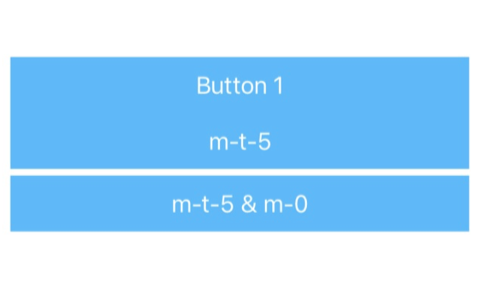
The NativeScript theme provides some nice helper classes for margin and padding. I wanted to apply a margin-top of 5 to my button. I've used m-t-5 which simply did not work on my button. When I've checked, we've already specified margin: 0 for our button (.btn) class. So first I thought it might be a problem of the the order the classes are applied but I could move them around without any success. For some reason I came up with a solution by adding m-0 to the button as well which does not make any sense for me but it works.
To Reproduce
CSS:
.btn {
    margin: 0;
}
Layout:
<StackLayout class="home-panel">
    <Button class="btn btn-primary" text="Button"></Button>

     <!-- Expecting here a margin of 5 at the top, but does not work -->
     <Button class="btn btn-primary m-t-5" text="m-t-5"></Button>

      <!-- This is working for some reason, by adding 'm-0' as additional class, but
	     that doesn't make sense since '.btn' has also 'margin: 0' defined -->
      <Button class="btn btn-primary m-t-5 m-0" text="m-t-5 & m-0"></Button>
 </StackLayout>
Expected behavior
My expectation: m-t-5 (or m-t-N) should overwrite the margin: 0 of the .btn class we specified. The current solution is actually something I'd say is incorrect - since m-0 should overwrite m-t-5
Sample project
I've created a pretty simple playground to demonstrate the problem: https://play.nativescript.org/?template=play-ng&id=ad5EUa&v=3
Only needed to add the css as described above and changed the layout in the home component.
Want to back this issue? Post a bounty on it! We accept bounties via Bountysource.