Crash when login with Android 7 (API 24 and 25) Google Pixel Emulator
Nobody has claimed this yet.
Assessment
- Difficulty
- 3/5
- Estimated time
- 1-2 days
- Newbie friendliness
- 35/100
- Issue type
- Bug
- Clarity
- Needs clarification
- Activity status
- Stale
- Tech stack
- android, kotlin
- Domain
- authentication, mobile
Research direction
Start with org.torusresearch.customauth.activity.StartUpActivity.onCreate at line 75, where CustomTabsIntent.launchUrl triggers the ActivityNotFoundException on Android API 24 and 25. Reproduce the Google login flow in the referenced Pixel emulator configurations and inspect how the torus:// redirect intent is handled. Done means login no longer crashes on those API levels and the redirect flow completes.
Written by the indexing model from the issue text.
Description
Hi @phuctm97
I clone you simple to test login with google but i got an issue below.
Can you take a look to see that ?
Thanks so much.
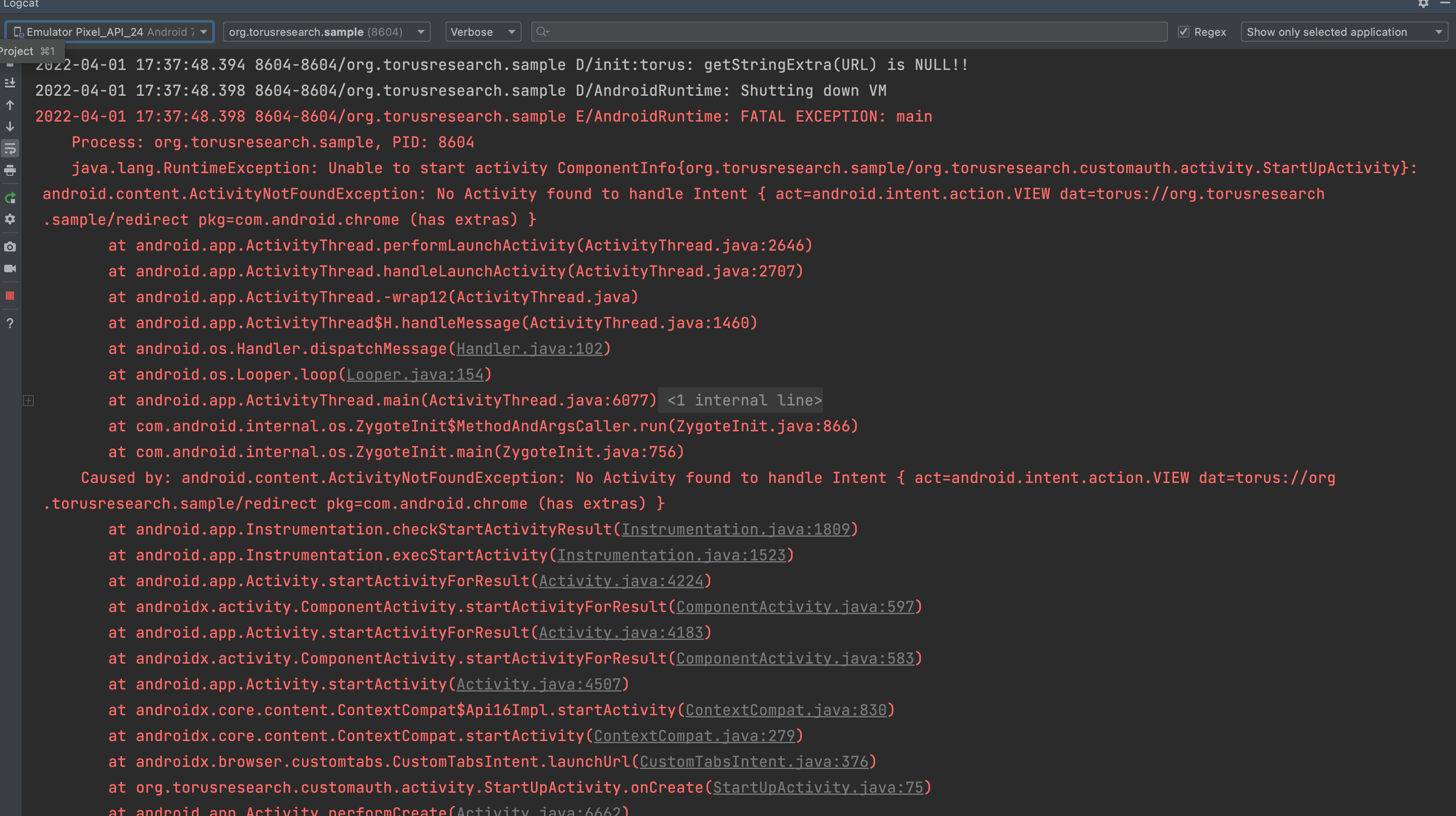
2022-04-01 17:37:48.398 8604-8604/org.torusresearch.sample E/AndroidRuntime: FATAL EXCEPTION: main
Process: org.torusresearch.sample, PID: 8604
java.lang.RuntimeException: Unable to start activity ComponentInfo{org.torusresearch.sample/org.torusresearch.customauth.activity.StartUpActivity}: android.content.ActivityNotFoundException: No Activity found to handle Intent { act=android.intent.action.VIEW dat=torus://org.torusresearch.sample/redirect pkg=com.android.chrome (has extras) }
at android.app.ActivityThread.performLaunchActivity(ActivityThread.java:2646)
at android.app.ActivityThread.handleLaunchActivity(ActivityThread.java:2707)
at android.app.ActivityThread.-wrap12(ActivityThread.java)
at android.app.ActivityThread$H.handleMessage(ActivityThread.java:1460)
at android.os.Handler.dispatchMessage(Handler.java:102)
at android.os.Looper.loop(Looper.java:154)
at android.app.ActivityThread.main(ActivityThread.java:6077)
at java.lang.reflect.Method.invoke(Native Method)
at com.android.internal.os.ZygoteInit$MethodAndArgsCaller.run(ZygoteInit.java:866)
at com.android.internal.os.ZygoteInit.main(ZygoteInit.java:756)
Caused by: android.content.ActivityNotFoundException: No Activity found to handle Intent { act=android.intent.action.VIEW dat=torus://org.torusresearch.sample/redirect pkg=com.android.chrome (has extras) }
at android.app.Instrumentation.checkStartActivityResult(Instrumentation.java:1809)
at android.app.Instrumentation.execStartActivity(Instrumentation.java:1523)
at android.app.Activity.startActivityForResult(Activity.java:4224)
at androidx.activity.ComponentActivity.startActivityForResult(ComponentActivity.java:597)
at android.app.Activity.startActivityForResult(Activity.java:4183)
at androidx.activity.ComponentActivity.startActivityForResult(ComponentActivity.java:583)
at android.app.Activity.startActivity(Activity.java:4507)
at androidx.core.content.ContextCompat$Api16Impl.startActivity(ContextCompat.java:830)
at androidx.core.content.ContextCompat.startActivity(ContextCompat.java:279)
at androidx.browser.customtabs.CustomTabsIntent.launchUrl(CustomTabsIntent.java:376)
at org.torusresearch.customauth.activity.StartUpActivity.onCreate(StartUpActivity.java:75)
at android.app.Activity.performCreate(Activity.java:6662)
at android.app.Instrumentation.callActivityOnCreate(Instrumentation.java:1118)
at android.app.ActivityThread.performLaunchActivity(ActivityThread.java:2599)
at android.app.ActivityThread.handleLaunchActivity(ActivityThread.java:2707)
at android.app.ActivityThread.-wrap12(ActivityThread.java)
at android.app.ActivityThread$H.handleMessage(ActivityThread.java:1460)
at android.os.Handler.dispatchMessage(Handler.java:102)
at android.os.Looper.loop(Looper.java:154)
at android.app.ActivityThread.main(ActivityThread.java:6077)
at java.lang.reflect.Method.invoke(Native Method)
at com.android.internal.os.ZygoteInit$MethodAndArgsCaller.run(ZygoteInit.java:866)
at com.android.internal.os.ZygoteInit.main(ZygoteInit.java:756)
- Dominant language
- Kotlin
- Stars
- 5
- Forks
- 2
- PR merge metrics
- No merged PRs in 30d
Contributor guide
No contributing guide indexed for this repository
First steps
- Read the whole issue, then the project's contributing guide.
- Comment on the issue to say you are picking it up — it saves two people doing the same work.
- Fork the repository and make your change on a branch.
- Open a pull request that references the issue number.
Similar issues
-
bug
Difficulty 2/5 1-3 hours Newbie friendliness 68/100
-
index-request triaged
Difficulty 2/5 1-3 hours Newbie friendliness 72/100
-
enhancement
Difficulty 2/5 1-3 hours Newbie friendliness 68/100
Anthonyy232/Paperize#614 ·
-
Difficulty 2/5 1-3 hours Newbie friendliness 76/100
bitcoindevkit/bdk-ffi#1125 ·
-
🌑 nextgen
Difficulty 2/5 1-3 hours Newbie friendliness 82/100
CCBlueX/LiquidBounce#9214 · 1 comment ·