
CommunityToolkit/WindowsCommunityToolkit
View on GitHubDataGrid: DataGridDetails height can grow, but never shrink
Open
#4,235 opened on Sep 9, 2021
DataGrid :capital_abcd:bug :bug:help wanted
Repository metrics
- Stars
- (5,708 stars)
- PR merge metrics
- (No merged PRs in 30d)
Description
Describe the bug
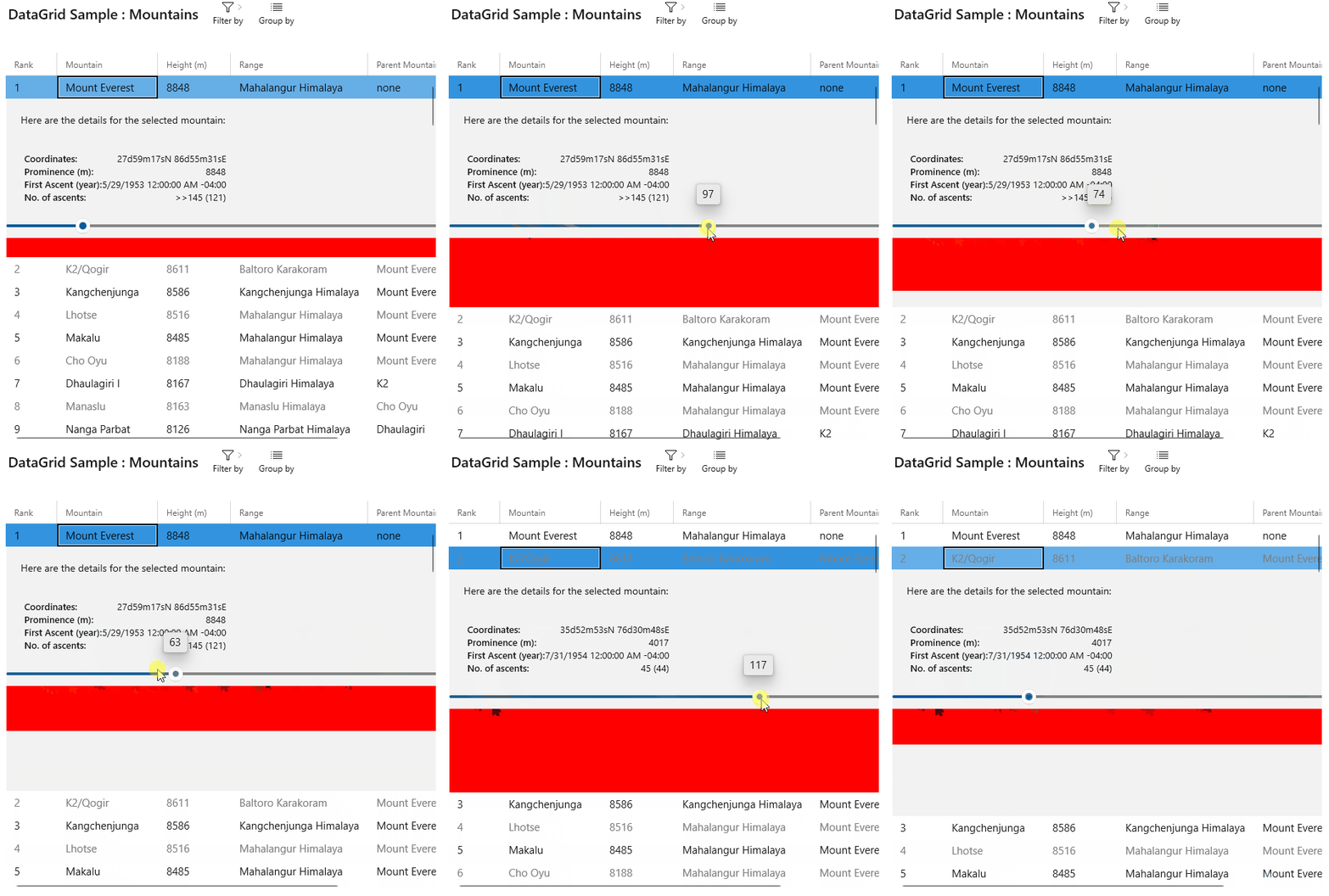
When using the RowDetailsVisibilityMode="VisibleWhenSelected" mode on <DataGrid /> and having a content with dynamic size, the content can grow but never shrinks. If the content shinks, the allocated space won't shrink. SEE ANIMAGED GIF BELOW, THE PROBLEM IS OBVIOUS.
Is this bug a regression in the toolkit? DON'T THINK SO
Steps to Reproduce
Can this be reproduced in the Sample App? YEP (check below)
Steps to reproduce the behavior:
- Take the WCT sample app and open the
DataGridCode.bindfile - In the
RowDetailsTemplateDataTemplate, add following lines just before the closing</StackPanel>:<Slider x:Name="height" Minimum="0" Maximum="200" StepFrequency="1" Value="10" /> <Rectangle Fill="Red" Height="{Binding Value, ElementName=height}" /> - Launch the WCT sample app + open the DataGrid sample
- Using the Properties pane, set the
RowDetailsVisibilityModetoVisibleWhenSelected - Select any row in the data grid
- Play with the slider an observe the resizing of the row details:
Expected behavior
The row details should shrink to following its content.
Screenshots
Environment
Observed on Windows.
NuGet Package(s): Observed on 7.0.2
Package Version(s):
Windows 10 Build Number:
- Fall Creators Update (16299)
- April 2018 Update (17134)
- October 2018 Update (17763)
- May 2019 Update (18362)
- May 2020 Update (19041) ---> 19043
- Insider Build ({build_number})
App min and target version:
- Fall Creators Update (16299)
- April 2018 Update (17134)
- October 2018 Update (17763)
- May 2019 Update (18362)
- May 2020 Update (19041)
- Insider Build ({build_number})
Device form factor:
- Desktop
- Xbox
- Surface Hub
- IoT
Visual Studio version:
- 2017 (15.{minor_version})
- 2019 (16.{minor_version})
- 2022 (17.{minor_version})