TV Show Project Level 500: Build a front page
Nobody has claimed this yet.
Assessment
- Difficulty
- 5/5
- Estimated time
- Over a week
- Newbie friendliness
- 35/100
- Issue type
- Feature
- Clarity
- Mostly clear
- Activity status
- Stale
- Tech stack
- javascript
- Domain
- frontend
Research direction
Start with README.md for the repository's submission instructions, then review the original codebase and the level 500 requirements. The work is done when the shows listing, show search, navigation, episode controls, and one-fetch-per-URL behavior all work together and the required partner-reviewed pull request is ready.
Written by the indexing model from the issue text.
Description
Level 500
For level 500, you should switch back to your original codebase.
You should have reviewed and merged someone else's level 400 implementation.
Once again, compare their implementation to yours. Think:
- How is it different?
- What do you prefer about your implementation?
- What do you prefer about their implementation?
- What did you learn that you didn't know before?
Have a discussion about your answers to these questions. In class, together you should give a 3 minute talk about your conclusions.
Refactoring
Feel free to change anything in your codebase which you think will make it easier to work with, or to build new features.
Make a branch and pull request for yourself, and then have your partner review, making sure they understand the changes made.
Adding new functionality
Level 500 is about adding a front-page which lets users select (and find) shows from your shows list.
Requirements
- When your app starts, present a listing of all shows ("shows listing")
- For each show, you must display at least name, image, summary, genres, status, rating, and runtime.
- When a show name is clicked, your app should:
- Fetch and present episodes from that show (enabling episode search and selection as before)
- Hide the "shows listing" view
- Add a navigation link to enable the user to return to the "shows listing"
- When this is clicked, the episodes listing should be hidden
- Provide a free-text show search through show names, genres, and summary texts
- Ensure that your episode search and episode selector controls still work correctly when you switch from shows listing to episodes listing and back
- During one user's visit to your website, you should never fetch any URL more than once.
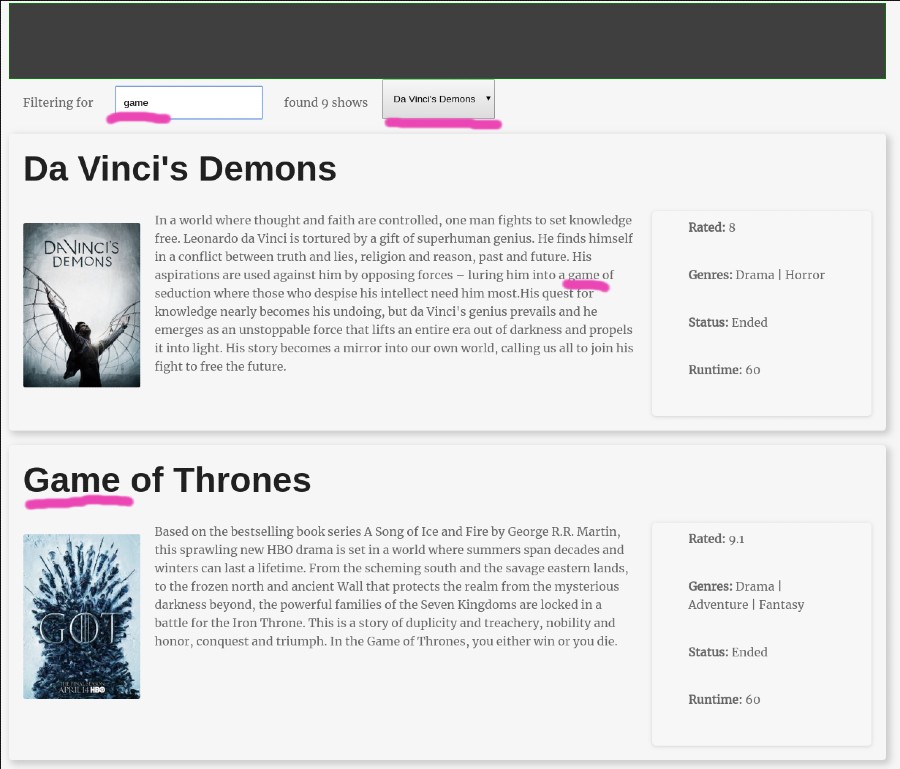
Screenshot of minimal version
Note: Provided your project meets the above requirements, it can look however you want.
Here is one example layout.
Submission
Once you have finished your level 500 it is ready to submit.
Check the README.md for this repo for instructions.
- Dominant language
- JavaScript
- Stars
- 0
- Forks
- 276
- PR merge metrics
- No merged PRs in 30d
Contributor guide
No contributing guide indexed for this repository
First steps
- Read the whole issue, then the project's contributing guide.
- Comment on the issue to say you are picking it up — it saves two people doing the same work.
- Fork the repository and make your change on a branch.
- Open a pull request that references the issue number.
More from CodeYourFuture/Module-Data-Flows
-
🏕 Priority Mandatory 📅 Sprint 3 Core Module-Data-Flows Submit:None 🦔 Size Tiny
Difficulty 1/5 Under an hour Newbie friendliness 85/100
-
🏕 Priority Mandatory 🐇 Size Small 📅 Sprint 2 Core Module-Data-Flows Submit:None
Difficulty 1/5 Under an hour Newbie friendliness 72/100
-
🏕 Priority Mandatory 🐂 Size Medium 📅 Sprint 3 Core Module-Data-Flows Submit:None
Difficulty 2/5 1-3 hours Newbie friendliness 35/100
-
🏕 Priority Mandatory 🐂 Size Medium 📅 Sprint 2 Core Module-Data-Flows Submit:None
Difficulty 2/5 1-3 hours Newbie friendliness 35/100
-
🏕 Priority Mandatory 🐂 Size Medium 📅 Sprint 1 Core Module-Data-Flows Submit:None
Difficulty 1/5 1-3 hours Newbie friendliness 35/100
All issues in CodeYourFuture/Module-Data-Flows
Similar issues
-
ai-observability bug team/ai-observability
Difficulty 2/5 1-3 hours Newbie friendliness 78/100
-
Difficulty 2/5 1-3 hours Newbie friendliness 68/100
AllTheMods/ATM-10-L#19 ·
-
Difficulty 2/5 1-3 hours Newbie friendliness 78/100
SignalK/n2k-signalk#345 ·
-
Difficulty 2/5 1-3 hours Newbie friendliness 84/100
-
Difficulty 1/5 1-3 hours Newbie friendliness 88/100
JuliaPluto/PlutoPlotly.jl#72 ·